
Answered
Event User Policy Question
Hi All I have a question regarding the above:
The option to select "All users created through event form are full Adobe Connect users" is greyed out and I cant select it, is there a way I can sort this out?
Cheers

Hi All I have a question regarding the above:
The option to select "All users created through event form are full Adobe Connect users" is greyed out and I cant select it, is there a way I can sort this out?
Cheers
Enabling an Event Manager to change the user creation policy is an Admin setting. Go to Administration > Account > Edit Information. There will be a drop down menu there for Event User Policy where you can define that all users created through an event are guests, registered users or the Event manager has the option to choose.
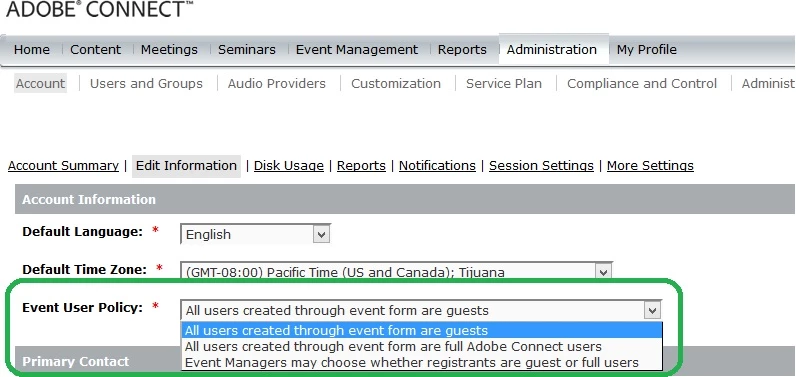
And yes, I agree that this is not in any way intuitive.
Already have an account? Login
No account yet? Create an account
Enter your E-mail address. We'll send you an e-mail with instructions to reset your password.


 AdChoices