
Participant
August 25, 2021
Answered

File screenshare_.flx is missing in ZIP file

  • August 25, 2021
  • 2 replies
  • 349 views

Hello,

With recording AdobeConnect meeting, I downloaded ZIP file this method :

output/filename.zip?download=zip.
I can download a zip file contain cameravoip_ flv and xml file, but the
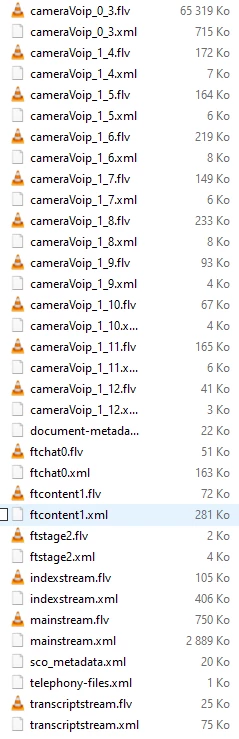
screenshare_ file is missing.
I want to recover the sharing screen of meeting to integrate in video and generate a MP4 with cameravoip AND screenshare.
How can I do this ?
Thanks
    This topic has been closed for replies.
    Correct answer Selim5E61

    OK

    I've 60 records on Connect.

    I use API AdobeConnect to download files.

    When I download, I can see zip files, pdf files and pdf2swf zip files.

    I thought I could build the final video with all these files.
    Too bad.
    I can't spend more than 60 hours uploading videos to the AdobeConnect client

    Thanks

    2 replies

    Jorma_at_CoSo
    Legend
    August 25, 2021

    You can't. These files are server side files that Connect uses to recreate the live meeting experience in an on-demand playback. 

    These files are bits and pieces. The cameraVoip is the audio, but the sco_metadata and telephony-files files are not useful for your purposes. If you want a video that you can edit, I'd suggest you use the Make Offline function available in the Actions drop down for the recording and it will make a MP4 version of the recording on your local computer that you can then edit as you see fit.

    Selim5E61AuthorCorrect answer
    Participant
    August 25, 2021

    OK

    I've 60 records on Connect.

    I use API AdobeConnect to download files.

    When I download, I can see zip files, pdf files and pdf2swf zip files.

    I thought I could build the final video with all these files.
    Too bad.
    I can't spend more than 60 hours uploading videos to the AdobeConnect client

    Thanks

    Jorma_at_CoSo
    Legend
    August 25, 2021

    If screen sharing was part of this recording it should live between the sco_metadata.xml and telephony-files.xml. Based on this I'd say that it is likely that someone uploaded content (PPT or PDF probably) to the Share pod and presented that way in this recording. 

    Selim5E61Author
    Participant
    August 25, 2021

    Hi Jorma_at_CoSo

    thanks for your response.

    The host of meeting shared a PDF file in meeting.

    How can I build a final video file with cameravoip, sco_metadata and telephony.xml files ?

    Have you a tuto to do this ?

    Thanks