
Answered
Host designation
I would like to designate someone as a host so that everytime they sign into a particular meeting they are listed as a "host". I do know how to change their status once they are in a meeting.

I would like to designate someone as a host so that everytime they sign into a particular meeting they are listed as a "host". I do know how to change their status once they are in a meeting.
Hi bcostigan,
You can do that from webapp. Click on Meeting Name in Connect webapp. Now click on Edit participants. You will see a swf with all the available groups and users listed on the left hand side. Click on the user you want to add in the meeting. Click on Add. Select the user and click on Set User role in the same swf. Set the role as host. Everytime that user enters this meeting room, he will enter as a host. You will see something similar to the following:
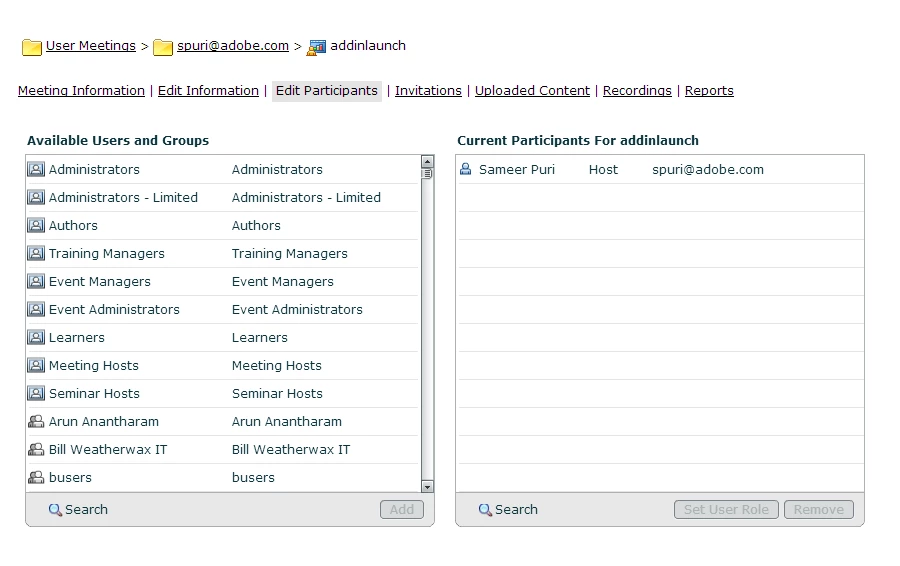
Btw, you can also change the role after the meeting has started. Just hover over the user name in the attendee pod and select make host in the hover menu that appears OR just drag drop the user to the hosts in the attendee pod.
Hope this helps!
Sameer Puri
Already have an account? Login
Enter your E-mail address. We'll send you an e-mail with instructions to reset your password.


 AdChoices