
Known Participant
August 9, 2013
Answered

How to let web users see a recorded seminar?

  • August 9, 2013
  • 1 reply
  • 1080 views

Hi,

we have seminars that we record. The process that I do now is to move the recorded session into Content folder.

  • Then I create an Event so I can keep on tracking the data of web users that want to access to the recorded seminar
  • Then I publish the URL of the registration of the Event, so users have to log in or register to access the recorded seminar

Is this process correct?

And then, when I go to the Event Management folder to see the Reports, I don't get the same data as what I get when the seminar was run. I know that parameters such as Q/A, or Chat will not be stored, obviously. But I can't get the data like Duration, and when did the users left the seminar.

Furthermore, when I go to the Content folder, I can't get any report data either.
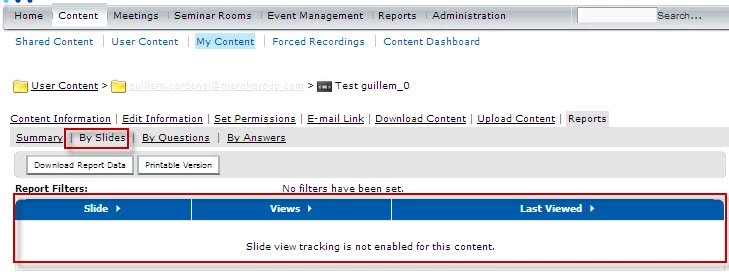
Is this correct?

Or else, how can I get some data of the visitors who are viewing my recorded seminars?

Thanks!

This topic has been closed for replies.
Correct answer Jorma_at_Knox

Presenter has the ability to report view duration and slide views, but only slide views will be seen in the content report. Even if the content is tied to an Event, the user specific duration will not be tracked.

If you need the user specific view duration tracking, and the user specific Slide Views, then you should use the Training Module.

So yes, using the Events module, you can track who is registering for, and then viewing, or not viewing, the recorded version.

The Training Module allows you to enroll individuals in the Course or Curriculum and then track which of those individuals viewed the training object(s), how long they viewed them, which slides they viewed, and how many attempts it took to pass the training (if applicable).

Both the Events and Training module allow you to set a start and end date for access to the object(s). So if you only want it available for 2013, then it can be set to that calendar year.

Feel free to PM me or email me if it would just make more sense to talk through it. My email is jorm[at]realeyesconnect.com

1 reply

Jorma_at_Knox
Legend
August 9, 2013

Meeting recordings do not report slide views or duration of viewing.

The Events module is a good way to be able to track the individuals viewing the recording, but will not give any additional reporting beyond that. If you need slide views and duration of viewing, then you should have a Presenter version of the recording and use that.

VbasariAuthor
Known Participant
August 12, 2013

Thanks Jorma for your kind answer.

Therefore I understand that if I create a Presenter version, I'll be able to track the duration and viewing, but then these KPIs will be in general, not split by users, correct?

Or better said, with the Event Module I'll be able to know who has registered to see the recorded version, and then on the Content area I'll be able to extract these KPIs, but I won't be able to relate them to the users that registered. Correct?

And then, when I create an Event, I need to define the "Starting" and "Ending" date, and since I want this Presenter version to be available for a long time, I should define the "Ending" in (eg.) year 2018.

Would that be correct?

Or else do you recommend another way to do so?

Thanks!

Jorma_at_Knox
Jorma_at_KnoxCorrect answer
Legend
August 12, 2013

Presenter has the ability to report view duration and slide views, but only slide views will be seen in the content report. Even if the content is tied to an Event, the user specific duration will not be tracked.

If you need the user specific view duration tracking, and the user specific Slide Views, then you should use the Training Module.

So yes, using the Events module, you can track who is registering for, and then viewing, or not viewing, the recorded version.

The Training Module allows you to enroll individuals in the Course or Curriculum and then track which of those individuals viewed the training object(s), how long they viewed them, which slides they viewed, and how many attempts it took to pass the training (if applicable).

Both the Events and Training module allow you to set a start and end date for access to the object(s). So if you only want it available for 2013, then it can be set to that calendar year.

Feel free to PM me or email me if it would just make more sense to talk through it. My email is jorm[at]realeyesconnect.com