TrevNew
Participant
May 1, 2015
Answered

How to limit what is shown on recording sessions

  • May 1, 2015
  • 1 reply
  • 368 views

When recording sessions is it possible to stop for example the attendee and poll pods being displayed in the recording i.e. just show the presentation and have the audio?

Any advice appreciated

Thanks in advance

    This topic has been closed for replies.
    Correct answer Jorma_at_Knox

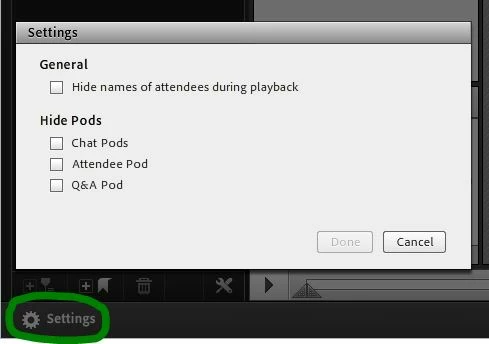
    When you are in the Edit Recording tool, you can click on the settings button on the lower left hand corner and you will be able to obscure attendee names and you can hide the Chat. Attendee and Q&A pods. This doesn't give more real estate to the presentation, but it does prevent those pods from being seen. You may want to call attention to the Full screen button that is at the top of the Share pod with the presentation in it. The viewer of the recording can click that and only look at the presentations.
    The other alternative is to take the audio from the recording and use it to create an presentation in Presenter. I've done this a number of times, but it isn't necessarily a fast process. But it does result in a presentation that is just the slide deck and audio.

    1 reply

    Jorma_at_Knox
    Jorma_at_KnoxCorrect answer
    Legend
    May 1, 2015

    When you are in the Edit Recording tool, you can click on the settings button on the lower left hand corner and you will be able to obscure attendee names and you can hide the Chat. Attendee and Q&A pods. This doesn't give more real estate to the presentation, but it does prevent those pods from being seen. You may want to call attention to the Full screen button that is at the top of the Share pod with the presentation in it. The viewer of the recording can click that and only look at the presentations.

    The other alternative is to take the audio from the recording and use it to create an presentation in Presenter. I've done this a number of times, but it isn't necessarily a fast process. But it does result in a presentation that is just the slide deck and audio.

    TrevNew
    TrevNewAuthor
    Participant
    May 4, 2015

    Many Thanks Jorma that worked fine for me