
dmitriyd21598679
Participant
September 6, 2015
Question

Install Adobe connect 8

  • September 6, 2015
  • 1 reply
  • 298 views

I deleted Adobe Connect 8 from the server. I deleted basis.

I  install set again.

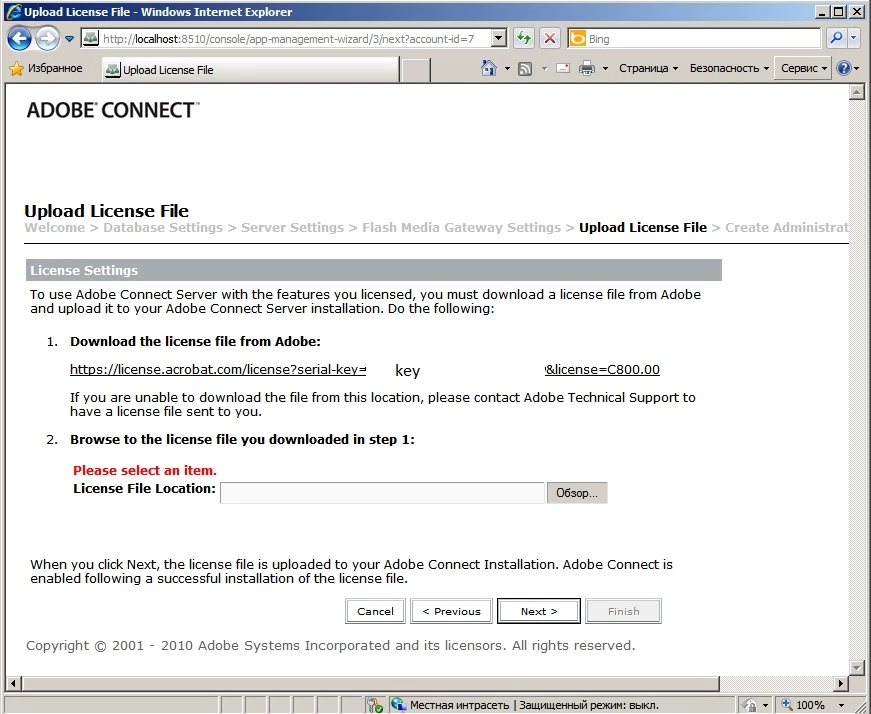
After installation I come into settings to activate. I download file License.

I specify a way of the file and there is a red text of Please Select item.

Therefore I can't pass further to create the accounting entry of the administrator.
    This topic has been closed for replies.

    1 reply

    Jorma_at_Knox
    Legend
    September 8, 2015

    After you download the license file to your server, you need to tell Connect where the license file is. You can manually type the file path to the license file or you can browse to it and select it using the button to the right of the License File Location.