
Participating Frequently
December 13, 2012
Question

Inviting to a meeting confusion

  • December 13, 2012
  • 1 reply
  • 560 views

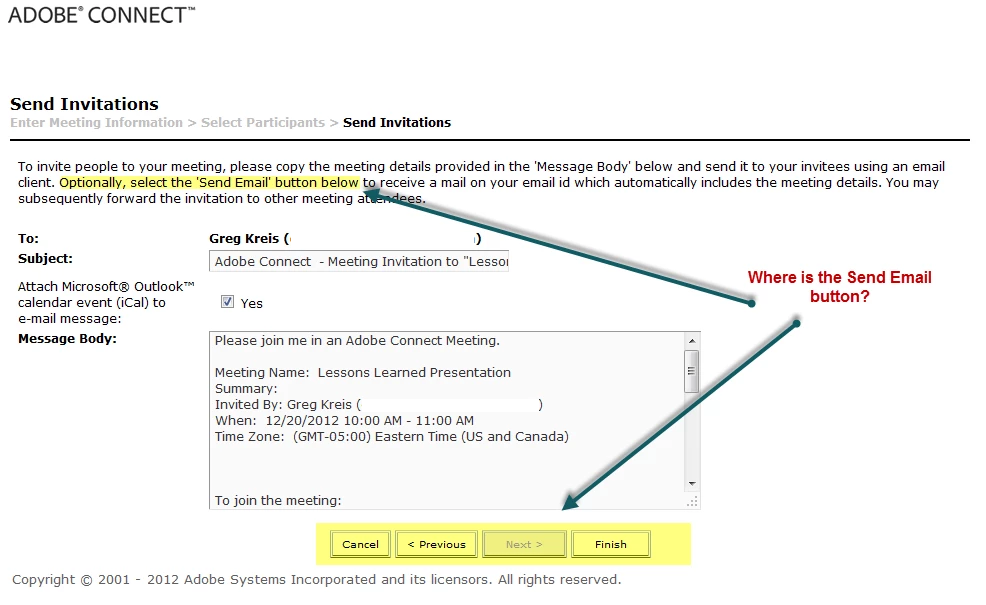
When I create a new meeting and add participants it doesn't let me send them an invite as the text below indicates it should.  When I tested further, it appears if you say 'anyone who has the link can attend' and yet have named participants (seemingly a contradiction), the text below is based on having participants, but it appears the logic for the buttons is saying if anyone can get in with the link, then they are going to get the link from some other effort.

How would you take it in that scenario?  I'd like to have it send the email, because I listed participants, but if they later shared the email with others by forwarding, that is there decision.  I'll submit this to Adobe, but want to see how others feel.
    This topic has been closed for replies.

    1 reply

    Jorma_at_Knox
    Legend
    December 13, 2012

    It has been this way for years (maybe since connect 7.5ish) when sending invites for the meeting room. Not being an Adobe employee, I'm not sure if this is the exact reasoning, but as I see this functionality has been set up with the following assumptions (right or wrong as they may be).

    Private rooms:

    Individuals should be predefined for the meeting, so Connect can infer that those individuals listed should be notified about being a part of the meeting.

    Public rooms:

    Since the room is publicly available, you will pass the link along to the individuals who are supposed to join as needed, so this is not a process that Connect needs to worry about.

    As to the functionality in the room creation wizard (in your shot above), I agree that this is misleading. In previous versions there was a button in this step to launch your own email client to send out the email. Not sure what happened here, but after you finish creating the room, go to the Invitations page, and the Send Email button will be there.