
Big Mouth Media
Inspiring
May 14, 2017
Answered

Local version of Connect recording at full frame rate ?

  • May 14, 2017
  • 1 reply
  • 340 views

I'm new to Connect and a client of ours has tasked me with editing one of their Connect sessions (removing some content, replacing others) - the MP4 file that I got from the production company runs at about 20.3fps, and ultimately I'd like to have the original at 25fps - does Connect record a local version that you can take off disk or do you only get what was output on the webcast ?
This topic has been closed for replies.
Correct answer Thomas Gunter-Kremers

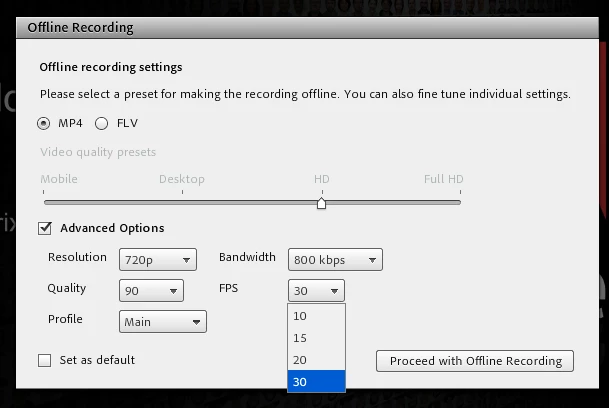
You can edit to remove content in our web based recording editing tool and then you can take the recording offline to make an MP4 and choose the frame rate you want (10,15,20 or 30) as well as the resolution

1 reply

Thomas Gunter-Kremers
Thomas Gunter-KremersCorrect answer
Participating Frequently
May 15, 2017

You can edit to remove content in our web based recording editing tool and then you can take the recording offline to make an MP4 and choose the frame rate you want (10,15,20 or 30) as well as the resolution