
E_slinger
Known Participant
March 12, 2018
Answered

"Manage Meeting Information" Option Disappeared?

  • March 12, 2018
  • 3 replies
  • 1036 views

All,

I am hoping for some guidance from the group.

I am admin for hosted Adobe Connect solution, and my meeting hosts have reported that they are missing "Manage Meeting Information" from the Meeting menu in the Connect Application. I can see this option if I log into the same meeting.
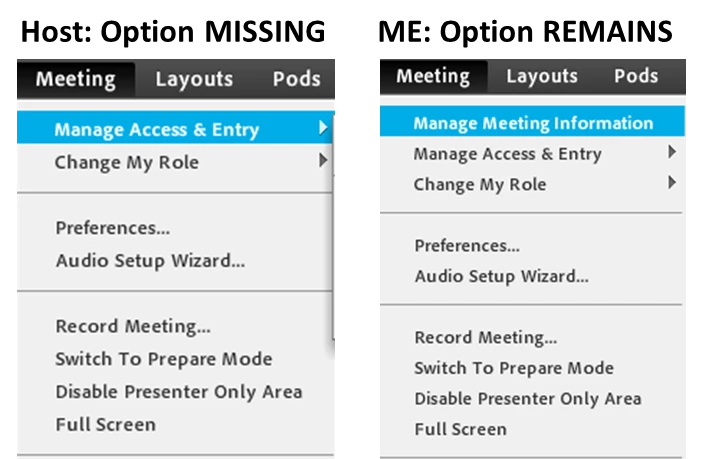
This option was available as of 3 weeks ago, but has only recently gone missing.

We have have been updated to V9.7.5

I have had them remove the old application and install a new one clean.

Thoughts?

    This topic has been closed for replies.
    Correct answer DonaC

    I chatted with Customer Support today as to why some meeting rooms have the Manage Meeting Information and some do not and he did get a Bug #.  Also he says it will be fixed in the Next Update!

    We informed you that post the upgrade to connect version 9.7.5, the option “Manage meeting information” is missing for the users who are added as promoted hosts or are listed under a custom host group under the edit participant list of the meeting room.

    We have logged a Bug # 4106380 for this issue and it will be fixed in connect version 9.8.

    As of now we don’t have any ETA regarding the release of connect version 9.8 since this bug was identified recently, however the workaround for now is to add the individual user as a host under the edit participant list of the meeting room
    as well as under Administration > User and Groups> Meeting Host Group

    3 replies

    DonaC
    Participant
    March 13, 2018

    We have this exact same issue happening!

    • 4 - Licensed Adobe Connect Users
    • 2 - lost Manage Meeting Information link
    • 2 - still have the Manage Meeting Information link

    Happened with this last update!  Not sure if it's related to the Users or the Classrooms?  The Classrooms used mirror the missing links.  (same 2 people use the same classrooms)

    We need that back!  Ideas??

    Jorma_at_Knox
    Legend
    March 13, 2018

    Dona,

    Thanks for speaking up. Hearing that more than one person is experiencing this is something that will help identify the issue and put urgency on the resolution. You may also want to reach out to Adobe Support with this issue. Adobe Connect Help | Adobe Connect Support

    E_slinger​, if you do get any feedback from Adobe Support, or even better a bug number, please share so others with this issue can call Adobe and let them know they are experiencing the same problem.

    DonaC
    DonaCCorrect answer
    Participant
    March 14, 2018

    I chatted with Customer Support today as to why some meeting rooms have the Manage Meeting Information and some do not and he did get a Bug #.  Also he says it will be fixed in the Next Update!

    We informed you that post the upgrade to connect version 9.7.5, the option “Manage meeting information” is missing for the users who are added as promoted hosts or are listed under a custom host group under the edit participant list of the meeting room.

    We have logged a Bug # 4106380 for this issue and it will be fixed in connect version 9.8.

    As of now we don’t have any ETA regarding the release of connect version 9.8 since this bug was identified recently, however the workaround for now is to add the individual user as a host under the edit participant list of the meeting room
    as well as under Administration > User and Groups> Meeting Host Group

    Jorma_at_Knox
    Legend
    March 12, 2018

    The only way I can replicate this is if I join my room as a guest and then promote that guest up. The guest user doesn't have access to Connect Central, so that option is on longer there.

    Here is an image of this. On the left is the Guest user and on the right is the registered user:

    Jorma_at_Knox
    Legend
    March 12, 2018

    Are they joining the room with a Username and Password or as a Guest?

    Assuming they are joining as a Registered User, Is the meeting in a folder that they have Manage rights to?

    I'll see if I can replicate the issue on my account.

    E_slinger
    E_slingerAuthor
    Known Participant
    March 12, 2018

    Hi,

    Yes they are all joining as registered users, and are part of the HOST group. Each room has the HOST group listed as included participants with the appropriate permissions at the room level.

    As a test, i also added them to the folder level, and confirmed the permissions of that group are set to Manage.

    Still nothing.

    Jorma_at_Knox
    Legend
    March 12, 2018

    Hmm, I tried just about every combination of permissions I could and only the guest user resulted in not seeing that menu option. It may be worth reaching out to Adobe to see if they have any information about what may have changed to cause this In Connect.