

"My meetings" shortcut missing
I have a problem with accessing "My Meetings" folder via Connect 9 Web services.
I have two Adobe Connect sites.
Site 1 (Correct site)
I login to the Connect Web interface and go to "Meetings" tab (warning: German interface):
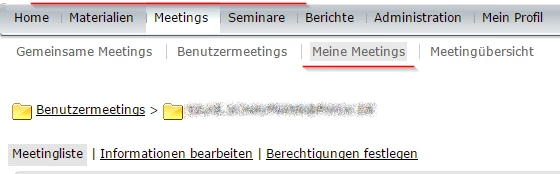
That is, I'm in "My meetings" folder ("Meine Meetings" in German).
I then use Web services to get its id. I call sco-shortcuts function and parse the result for the sco with the type=my-meetings as recommended in Using Adobe Connect 9 Web services PDF (Page 34). It works fine and I get the sco-id.
Site 2 (Problem site)
I login to the Connect Web interface and go to "Meetings" tab:
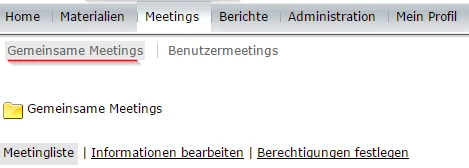
This time I'm in "Shared meetings" folder ("Gemeinsame Meetings"). And the "My meetings" folder is not even in the submenu. Interestingly though if I open the "User meetings" folder ("Benutzermeetings") I can see that there is a folder with my username and that I have "manage" permission on it.
I then try to call sco-shortcuts web service function and it returns me the list that has no folder with type=my-meetings. And this is my problem at the moment — the web service that was supposed to create a new meeting fails because it cannot find "My Meetings" folder.
Questions
Q1: I assume the sco-shortcuts result and the "submenu" that I see on these screens are connected. How can I add the "My meetings" shortcut to it provided that I have the login/password of the main administrator?
Q2: In my app I use a following workaround:
- Call sco-shortcuts and get sco-id of the folder with type=user-meetings
- Call sco-contents and find sco with the name same as current username.
It works for now and it allows me creating the meetings but I wonder if this is a viable solution to my problem.


 AdChoices