
User Content folder turned into a presentation icon!
Hello -- hoping someone here can give some insight. I published a presentation yesterday to my content folder... at the end when it published from Presenter, I got the url... when I clicked it, it took me to a white screen - so, I just closed out and decided to go in to my Connect account (I am the admin) - and just grab the url that way. When I got into My Content folder, I did not see the new folder that I created, nor the presentation. Did a quick search up in the search bar... nothing.
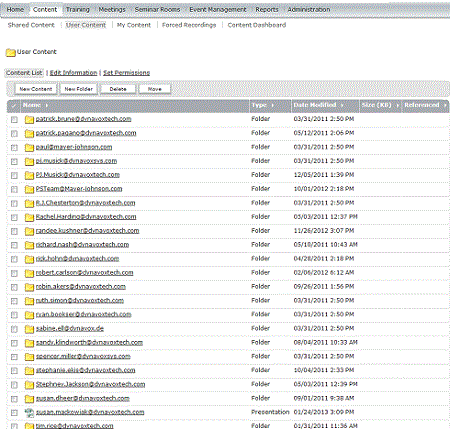
So, I head on over to the "User Content" area and look down through the folders to be sure something silly didn't happen and maybe I created a folder there somehow and published - while I am there, I see all of the users have folders, but my folder is now a presentation icon and is listed as 'presentation' in type...it has always been a folder... Granted, when I click on this, it still acts as a folder and shows all of "My Content" - but I am thinking something crazy happened when I was trying to publish. I just had 2 different cases with Adobe support and they are concentrating on me having the url for the presentation I was trying to publish... I don't have it because it didn't publish in my folder - the only thing that seems to have happened was this strange icon/type change of my content folder... I can republish, I just don't want to until I get this issue fixed.
You can see the folder structure here that it goes user content> then shows my name/account as a presentation or in the actual user content list, it may be easier to see what I am talking about.. incididentally, it is showing the date and time that folder was modified as the time I pulished the presentation yesterday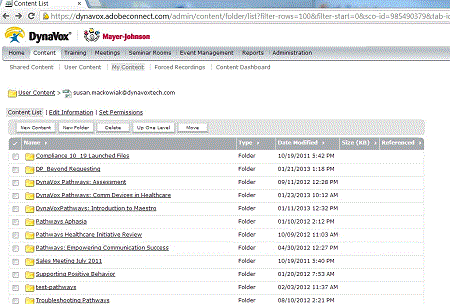
I am having a ton of Presenter issues with the upgrade, but that is a different discussion!


 AdChoices