
davido52286369
Participant
May 27, 2018
Question

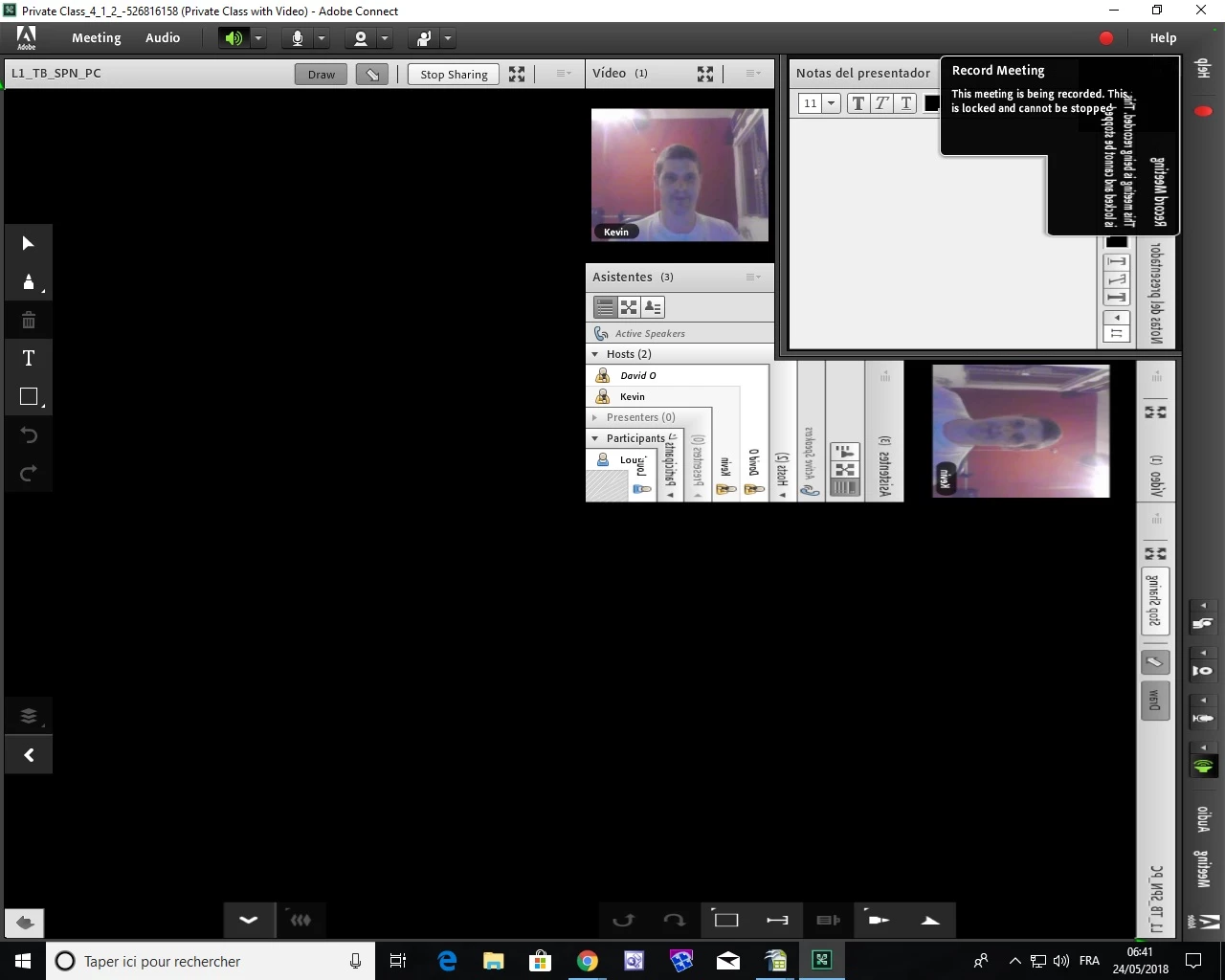
Why is my Connect screen divided diagonally and then reflected?

  • May 27, 2018
  • 2 replies
  • 1323 views

Hello, after my latest Windows 10 update my Connect screen doesn't display correctly; it is divided diagonally and then reflected.

Can anyone explain how to solve this problem?  Here is a screen shot of the probblem:
I have tried the test at the following link: 

https://openenglish.adobeconnect.com/common/help/en/support/meeting_test.htm

and it shows that everything should be working correctly.

This topic has been closed for replies.

2 replies

Participant
June 11, 2018

I had the exact same issue and was able to fix it by turning off hardware acceleration: Right-click -> settings -> uncheck "Enable Hardware acceleration" -> close. The close button is hidden by the mirrored graphics because it's in the bottom left corner of the dialog box, but it's still functional

Jorma_at_Knox
Legend
May 29, 2018

You are not the only one seeing this issue. No real answer as to what is causing it, but try uninstalling and reinstalling the App.

Here is another user reporting this issue. Connect: Faulty image rendering since Windows 10 update