


katp33273548
Participant
July 21, 2021
Question

3D Linear Gradient not working as intended?

  • July 21, 2021
  • 1 reply
  • 2581 views

So I've decided to try out 3D Linear Gradient on a piece I'm working on. I watched tutorials and it looks very straight forward: Add fill layer, add black mask to fill layer, add generator and choose 3D Linear Gradient.


Except when I do that, nothing happens. Let me explain:
Basically, when I add a black mask to my fill layer, in the videos I would see a black square show up right next to the fill layer thumbnail. and when the 3D Linear Gradient is added onto the generator, you would visibly see the a gradient on the black mask thumbail. That's not happening with me. Here is a screenshot of what my layers look like:
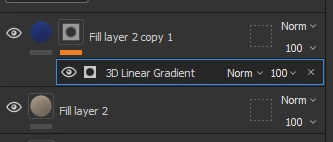
I see a square with a black circle instead. I'm fairly new to masking and have only been using Substance Painter for a few months now. I haven't had to use masking for my projects until now, so I'm not sure what's going on here. 

Also this is what I've been seeing in tutorial videos:
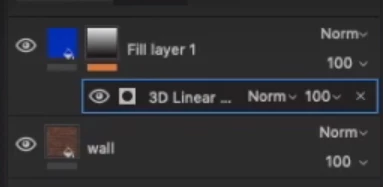
As you can see, it does not look the same. Am I missing something here?


Thanks

1 reply

Jeremie Noguer
Community Manager
Community Manager
July 21, 2021

You can switch back to the legacy thumbnails in the preferences, the option is called "Use simplified thumbnails".

The new method you see improves slightly performances at the cost of not seeing the actual mask in the stack.

katp33273548
Participant
July 21, 2021

Thank you for the reply but that doesn't seem to be it.
I checked my settings and it was off by default. I still tried it though (toggling it on and off) and did not see anything change. I'm still not able to get a gradient effect. Am I using the tool wrong?
Here is a screenshot to show you a bit more context and to see if there's anything that seems off?

Jeremie Noguer
Community Manager
Community Manager
July 23, 2021

If you are suing the "UV Tiles" option when creating your project, the thumbnails will not show, since Painter wouldn't be able to show what is happening in multiple tiles at once in a thumbnail. If you are not working with UV Tiles, or UDIM, make sure you disable that option in the new project window when starting a new project.