UY320
Community Expert
Community Expert
July 6, 2021
Answered

About thumbnail display of masks

  • July 6, 2021
  • 2 replies
  • 396 views

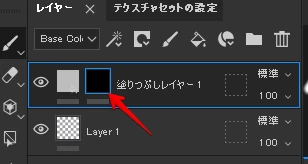
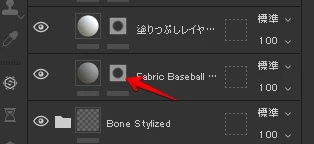
The thumbnail of the mask is displayed differently.
What is the difference between this?
I want the masked part to appear.
(I'm sorry if the sentences are strange because I'm not good at English.)
  

This topic has been closed for replies.
Correct answer Cyril Dellenbach

Hi @yu26433436nb4d and @UY320,


Sorry for the delay in response.


This is an interesting question. The masks thumbnail depend on multiple things. First of all, if you are working with UDIM, Substance 3D Painter will automatically simplify the thumbnails (for optimisation).


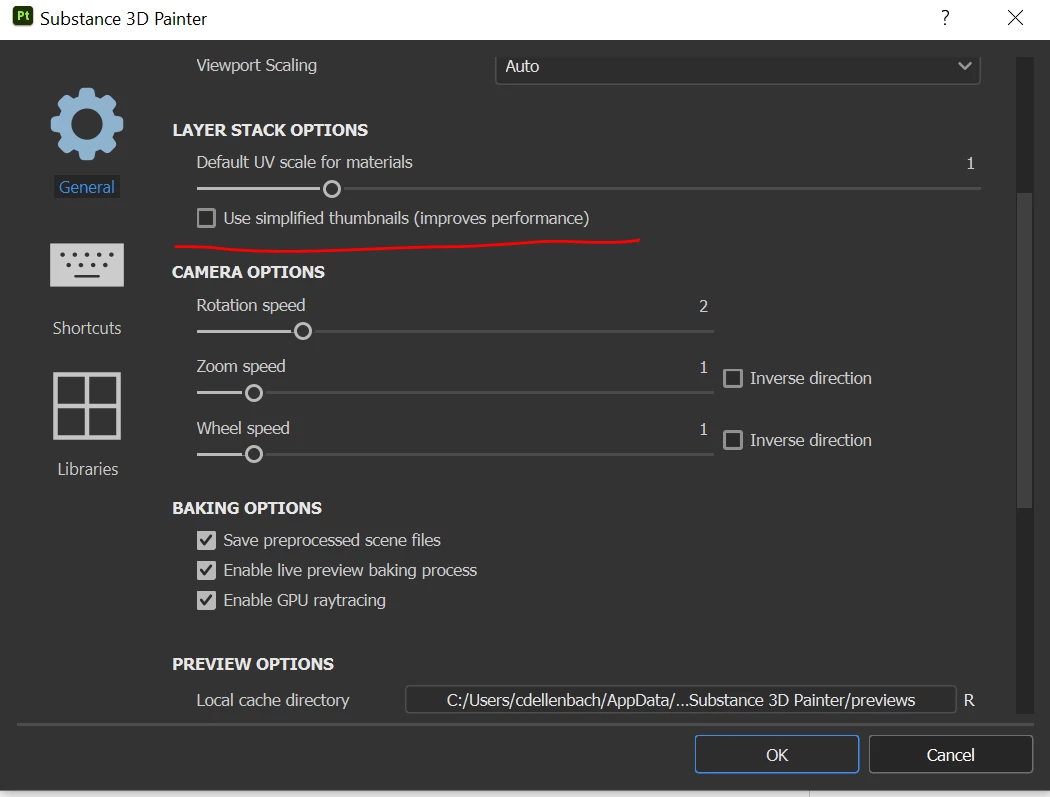
On the other hand, if you're not working with UDIM you can switch options, under Edit>Settings>General>Layer stack options>Use simplified thumbnails 


2 replies

Cyril Dellenbach
Community Manager
Cyril DellenbachCommunity ManagerCorrect answer
Community Manager
February 22, 2023

Hi @yu26433436nb4d and @UY320,


Sorry for the delay in response.


This is an interesting question. The masks thumbnail depend on multiple things. First of all, if you are working with UDIM, Substance 3D Painter will automatically simplify the thumbnails (for optimisation).


On the other hand, if you're not working with UDIM you can switch options, under Edit>Settings>General>Layer stack options>Use simplified thumbnails 


Cyril Dellenbach (Micro) | QA Support Artist | Adobe
Participant
February 22, 2023

I got the same question!