
Participant
Nov 20, 2022 4:47 PM UTC
Answered

After baking wierd triangle shaped lines appeared

I have tried rebaking with different setting to no avail, according to me the uv's are good, so yeah I am absolutely clueless here is a screenshot of the issue:
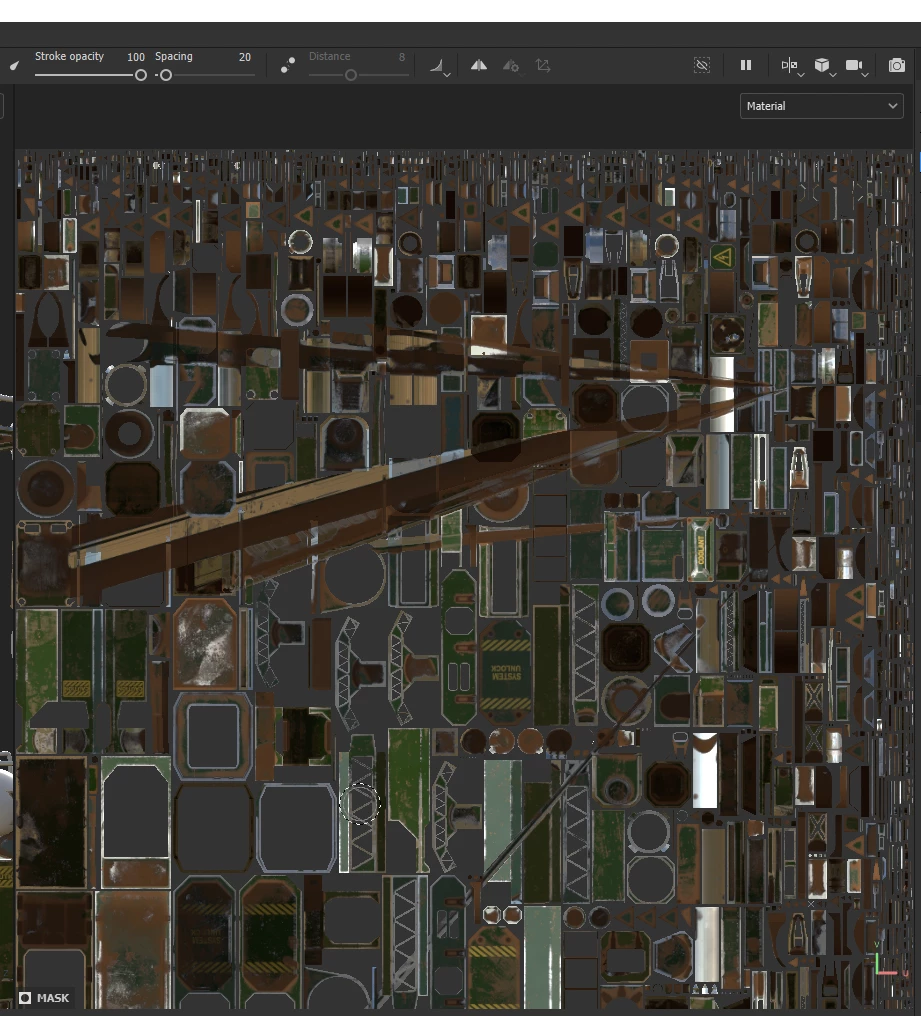
These weird lines are also visible on the model.

This topic is closed to new replies. Start a new post to keep the conversation going.
Tadeusz27228116oewkCorrect answer
Participant
Nov 21, 2022 6:33 PM UTC

Thanks for replying. I have fixed the issue by changing the model format from obj to fbx. I didn't have any issues with baking mesh maps from fbx. You might be right with saying that it was an UV issue but it seems only confined to the obj format. I aprecciate your very quick response time, if you have any further questions feel free to reply below.

3 replies

GeoffroySC
Community Manager
Community Manager
Nov 21, 2022 1:17 PM UTC

Hi, would you mind sharing your model for us to test? With this picture alone it really looks like you have UV issues! Since you say this is a bug and that you're UVs are correct it might be a problem with the importing of your asset by Painter, a log (Help>Export a log...) would help us pinpoint the origin of the problem.

Thank you for your help,

Kind Regards,

Geoffroy SC

Translate
Tadeusz27228116oewkAuthorCorrect answer
Participant
Nov 21, 2022 6:33 PM UTC

Thanks for replying. I have fixed the issue by changing the model format from obj to fbx. I didn't have any issues with baking mesh maps from fbx. You might be right with saying that it was an UV issue but it seems only confined to the obj format. I aprecciate your very quick response time, if you have any further questions feel free to reply below.

Translate