


Participant
September 22, 2023
Answered

applying imported textures to circular surface

  • September 22, 2023
  • 1 reply
  • 221 views

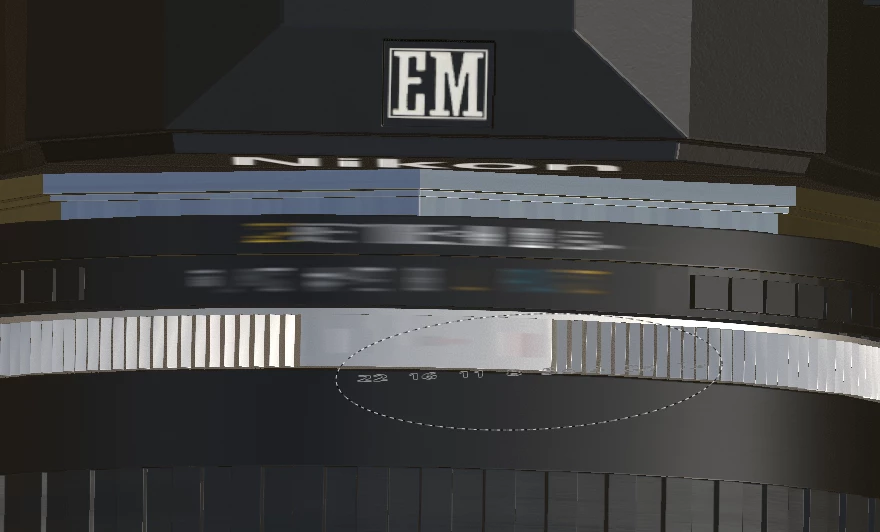
Hi, I'm working on texturing a camera model and I'm having trouble applying textures I created in Photoshop for the f-stop markings on the lens. They come out looking like this: If I apply them to a flat surface they look fine. What am I doing wrong?
This topic has been closed for replies.
Correct answer Michael24867556l1nh

It was the UVs....or actually the lack of. I had decided to rebuild the lens and in my haste to get back to texturing I completely forgot to do the UVs. DUH!

1 reply

Cyril Dellenbach
Community Manager
Community Manager
September 25, 2023

Hi Michael,


This stretching issue is probably related with how the UVs were built. Can we have a look at the UV map?


Cyril Dellenbach (Micro) | QA Support Artist | Adobe
Michael24867556l1nhAuthorCorrect answer
Participant
September 30, 2023

It was the UVs....or actually the lack of. I had decided to rebuild the lens and in my haste to get back to texturing I completely forgot to do the UVs. DUH!