


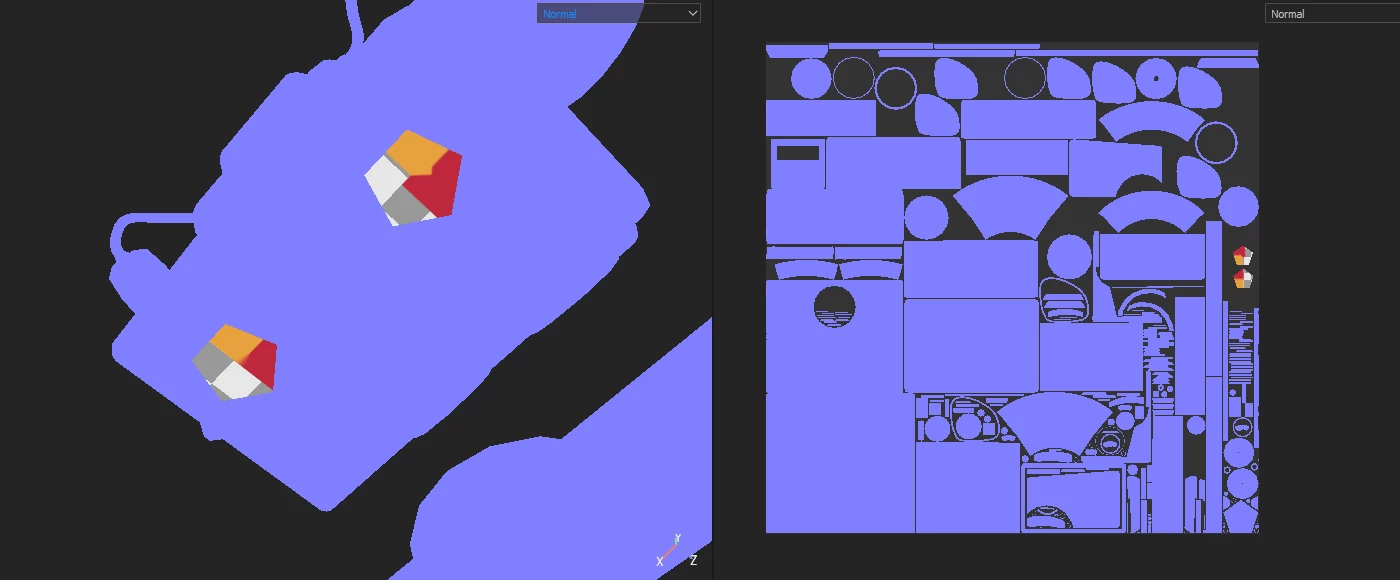
Baking not working on part of the mesh, its broken on only 2 islands
Something has gone wrong with in the Normals (both Normal and World Space) the ID map also has holes in it, not sure if this is becaus of the normals though (I dont work with ID maps). I'm working from 3Ds Max and Substance Painter Version 2020.2.2 (6.2.2). I have also tried it in Substance 3D Painter, version 7.4.3 (Build 1610 - 7fb11e93372084443976065c4dd47f45a8f0940c) I still get the same issue.
I've uploaden the log file and images, both bake exports and viewport screenshots since I can't figure out whats wrong.
Ive tried:
Rebaking (multiple times in many output sizes),
rebaking in a new file,
giving it a new material across the whole mesh,
Deleting the polys, recaping and unwraping them
made sure the id maps are the same across the whole mesh,
made sure the normals are facing the correct way,
I've tried moving the 2 islands to a diferent part of the uv layout but its like Substance Painter doesnt recognise them as islands. I can draw on them perfectly with a brush tool and it comes out in good resolution. I am out of ideas at this point, Let me know if you need more information.
 AdChoices