Participant
Apr 7, 2022 5:11 AM UTC
Answered

Color Space for normal maps (OpenGL / DirectX) on fill layers?

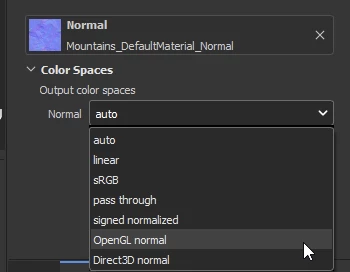
In previous versions of Painter I could chose if my imported on a layer normal map was GL or DX format (or or any other color space from the list), now that arrow to select color space is gone, was it moved someplace else or removed?
If removed, what's the logic behind it? I now have to flip all my maps before importing....

This topic is closed to new replies. Start a new post to keep the conversation going.
davescm
davescmCorrect answer
Community Expert
Apr 7, 2022 10:51 AM UTC

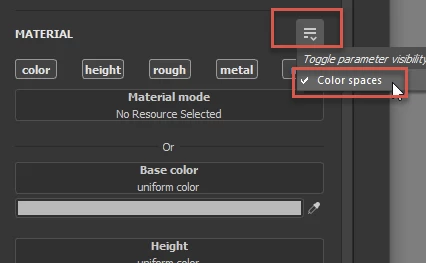
In the material properties for Fill Layer click the menu and toggle on 'Colour spaces'


Then use the drop down to set the colour space


Dave

2 replies

davescm
Community Expert
davescmCommunity ExpertCorrect answer
Community Expert
Apr 7, 2022 10:51 AM UTC

In the material properties for Fill Layer click the menu and toggle on 'Colour spaces'


Then use the drop down to set the colour space


Dave

Translate
NyoteeAuthor
Participant
Apr 7, 2022 3:15 PM UTC

Thanks a bunch, that small UI change had me lost.

Translate