



RAMWolff54
Inspiring
June 1, 2023
Answered

Computations are getting rediculous. How do I lighten my load?

  • June 1, 2023
  • 1 reply
  • 459 views

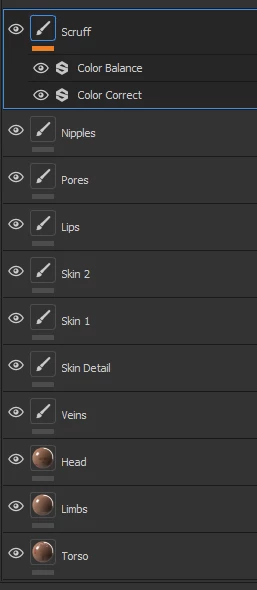
So I'm working on a human skin set up for a figure from Poser.  SO there is a the UDIM setup of just the skin areas, Head, Torso and Limbs and then quite a few Paint layers of various types like skin, pores, vascular system and all that.  These past few sessions have SP constantly computing.  I realize I can turn that off but then when I turn it back on I fear a crash as it's going to have allot to do. 


So I'm reaching out for some advice on what all I can do to speed things up again and not have to constantly wait for it to finish computing.  This last session was so bad that it froze and my system actually freaked out a bit because of all the RAM it was using.  So I rebooted the system.  Can't work like this. 


My basic system is Windows 11 Ryzen 7 3700X - GeForce RTX 3070 - 16GB DDR4


Below is a screen grab of all the layers I have going..... a good many of them have Height and Normal on for all the detail work....


Thanks so much

Richard
 

This topic has been closed for replies.
Correct answer davescm

What is your opinion about merging layers down?  Will that help?


Unlike Photoshop there is no 'merge down'. Even if there was I wouldn't use it as it takes away the ability to re-edit easily.

What you could do is group layers that you are not currently editing and set the blending mode of the group to normal. That means the computation does not have to be done for every layer in the group for each change, rather the group is treated as a whole.

You could also use functions such as Texture set isolate (Alt Q) to show only the set you are currently editing.


Dave

1 reply

davescm
Community Expert
Community Expert
June 1, 2023

Can you work at a lower resolution for texturing and then export at a higher, more detailed resolution? Do make sure any baked maps are baked at high enough resolution for the final export though.

Dave

RAMWolff54
Inspiring
June 1, 2023

I was wondering if it might be worth just merging quite a few of the layers?  I mean my pores and veins are all kind of mixed up as well as the Skin details layers. 


I'm afraid if I'm working at a lower rez then I may not see the details well enough or is that not correct? 

davescm
Community Expert
Community Expert
June 1, 2023

Working at low res with procedural textures would affect what you see on screen. Whether that affects your particular use and model will depend on the textures you are using. It would not affect final output though as all procedural texture would be recalculated at the final size on export.


Dave
