


Participant
August 22, 2026
Question

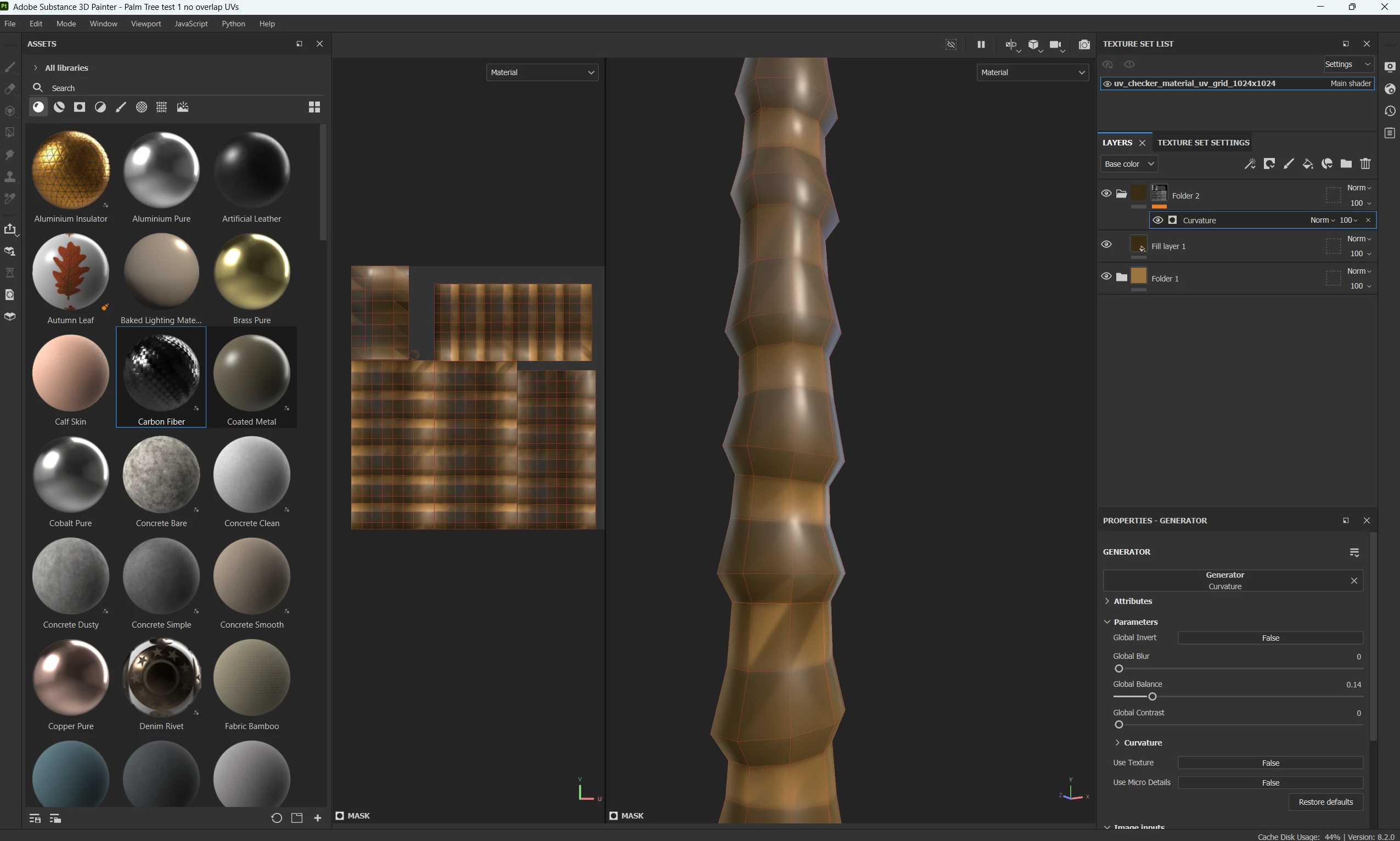
Curvature maps displaying wrong

  • August 22, 2026
  • 2 replies
  • 29 views

Hi there

As you can see in image below, my curvature mask is being display with horizontal and diagonal direction, why? I want to add a darker shapes only on areas where the normals are pointing down ( is a palm tree ) ( i am a noob just starting with Painter ) Help Thanks
 

    2 replies

    Cyril Dellenbach
    Community Manager
    Community Manager
    August 24, 2026

    Are you using a High poly mesh for the baking or are you baking low on low? Do you have Ngon in your topology? Can you show us a screenshot of your curvature map?

    In the baking tab, you can try to switch the Curvature method for “Based on Normal Map” instead of “Based on Mesh”


    Cyril Dellenbach (Micro) | Product Manager | Substance Painter
    Participant
    August 24, 2026

    Hi, could you check this video please, there i record my screen showing. I imported that geometry and baked it as it is. I don’t have a high poly version. The top of the palm tree has around 7 vertex ( you can see it in my previous screenshot, in the uvs, is really small but visible ) 
    https://jumpshare.com/s/vjxzNFhJpdCYNkVMmJje