


Participant
August 23, 2026
Question

Dark spot on normal channel won't delete

  • August 23, 2026
  • 5 replies
  • 37 views

I’m painting manually base colour and normal material for my model. After a while i turn the model to check the other side and I’m met with this huge black spot. I go through single channels, it is only shown in normal channel and normal+height+mesh channels. I tried to delete it by using eraser with normal material only turned on, nothing happend, it only deleted the actuall normal materials under it. I cant paint over it or do anything to it. 
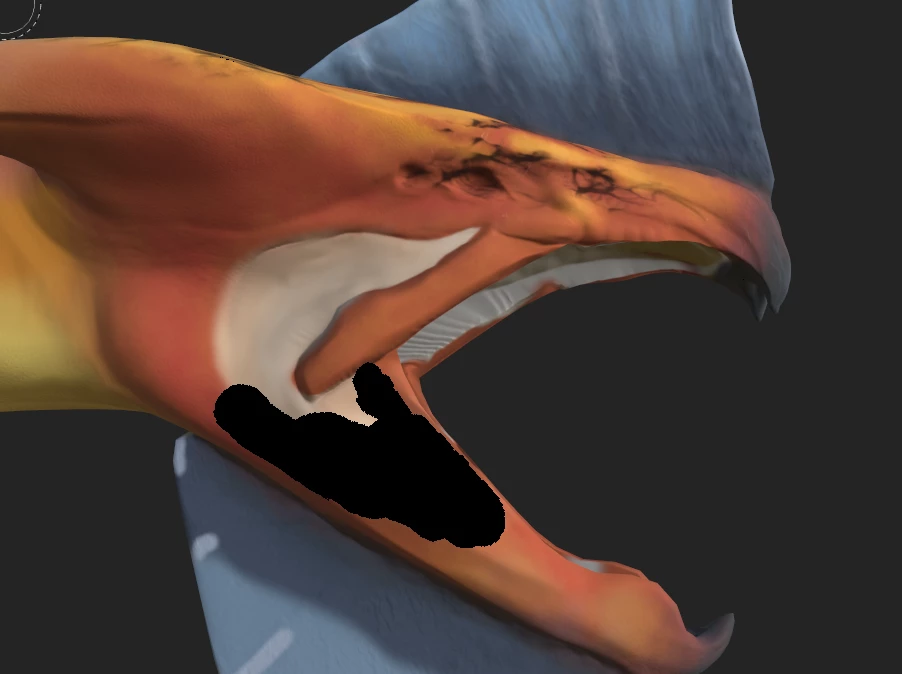
One bad thing that I did is that I painted base colour and normals in one layer. So I can’t really delete just one layer that could have had the normals painter in it. 

    5 replies

    Cyril Dellenbach
    Community Manager
    Community Manager
    August 24, 2026

    But do you know which layer makes this trouble? If you hide the paint layer your mentioned in your first message, does this black spot disappear? The spot really looks like a painted one, so either there was an issue at some point with the normal, or by some sort of accident you painted the black spot in your normal map.

    Cyril Dellenbach (Micro) | Product Manager | Substance Painter
    Participant
    August 24, 2026

    It’s in the Skin layer and when I turn the layer off it dissappears. But because I painted base colour and normals together in this one layer, i checked channels and saw that the black dot is visible through normal channel and normal+height+mesh channel. 

    I tried to use eraser and only turned on the nrm in properties, but that did nothing and only deleted the actuall rgb normal data. Tried the same thing for height setting in eraser properties. Still nothing helped. On the last picture you can see the before and after I tried to erase the black spot on the model. Only the purple/blue colour is erased not the black


    Cyril Dellenbach
    Community Manager
    Community Manager
    August 24, 2026

    Can you show me both the Normal and the Base Color channel ? In the top right corner of your viewport, you can switch the display option. Are you also baking the model ?

    Cyril Dellenbach (Micro) | Product Manager | Substance Painter
    Participant
    August 24, 2026

    Yes, the model was baked. I used lowres model and baked highres version on it. I’ve been working on this project for the past 2 months and I had to take like 3 weeks off because of work. Returned to it yesterday, continued to paint and after maybe like 2 hours I saw that during those 2 hours the black spot appeared on one side only.