Participant
August 11, 2023
Answered

Exporting diffuse from specific group?

  • August 11, 2023
  • 1 reply
  • 372 views

Hi!


I'm looking for a way to export multiple diffuse at the same time from the same project.


Let's say I want to export my regular textured diffuse, but I'd also like to export at the same time and as a separate output a specific group which only contains a black layer and a white layer with a mask on top (this is just an example to make things simple).


So basically, exporting two diffuse outputs at the same time, one of which only references a group (or a layer) in particular.


Is there any way to do that, or something close to it? Thanks a lot!

This topic has been closed for replies.
Correct answer Cyril Dellenbach

Hello @alligator-dosh,


Thanks for the question.


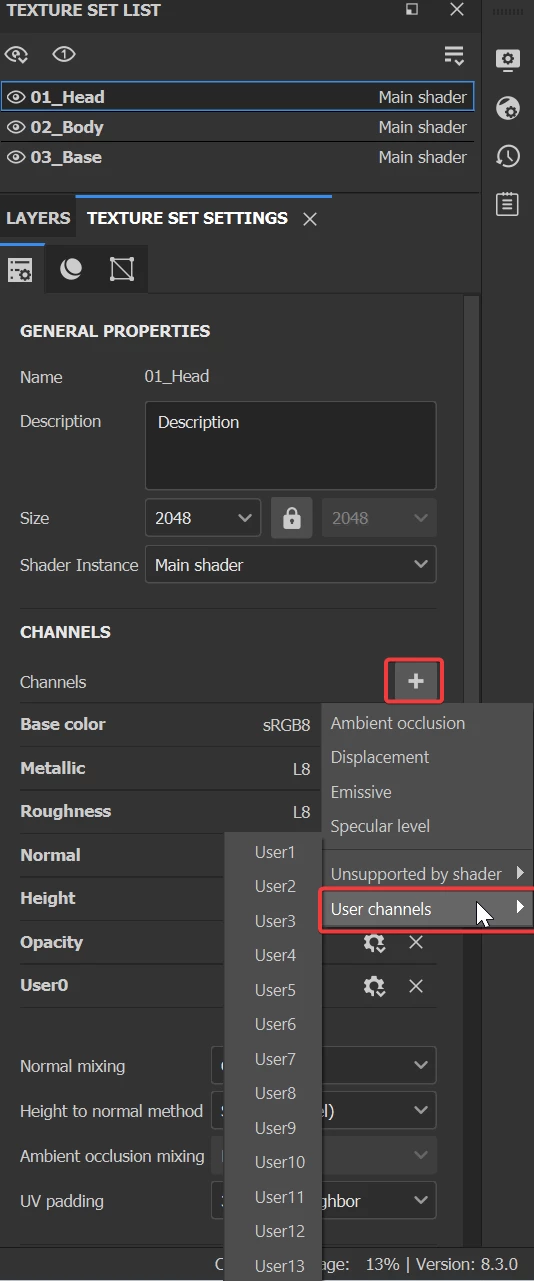
You can add to your channels a custom one named "user" that you'll be able to export as any other channel.


You can perfectly build a second Diffuse through this channel.


Best regards,


1 reply

Cyril Dellenbach
Community Manager
Cyril DellenbachCommunity ManagerCorrect answer
Community Manager
August 14, 2023

Hello @alligator-dosh,


Thanks for the question.


You can add to your channels a custom one named "user" that you'll be able to export as any other channel.


You can perfectly build a second Diffuse through this channel.


Best regards,


Cyril Dellenbach (Micro) | QA Support Artist | Adobe
Participant
August 14, 2023

Hi Cyril,


This is exactly what I was looking for. I don't know how I overlooked this for so long. Thanks a lot!