


Participant
July 17, 2022
Question

Extract Output template from Cache
  • July 17, 2022
  • 3 replies
  • 7458 views

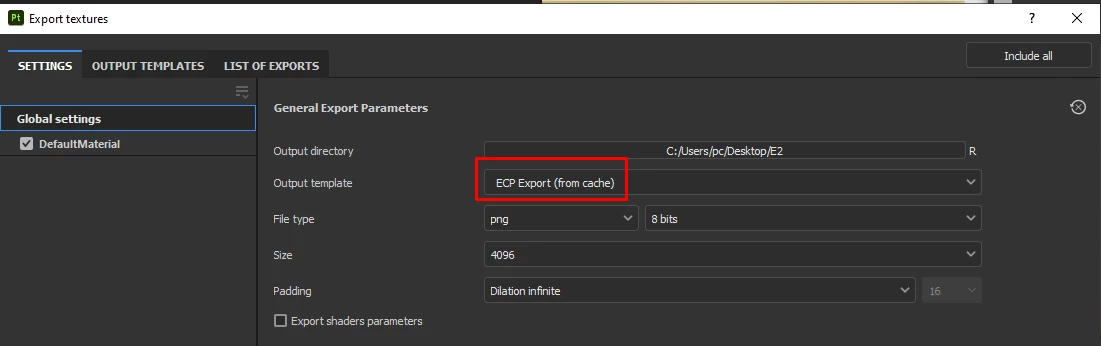
I have spp file with Output template "ECP Export".

But i lost this Output template "ECP Export". So i want to extract this Output template from this spp file.

In circumstance i make a new file it will not show me the ECP Export.


This topic has been closed for replies.

3 replies

Participant
January 9, 2024

I've ran into the same issue, did you ever find a way around this?

Participant
January 19, 2024

Hello,

Just figured this out so thought id share.

With your substance scene opened go to C:\Users\<Username>\AppData\Local\Temp

Go to the folder name "SubstancePainter-Tmp-" or something similar.

Then within that search for ".spexp"

You should find one with random numbers and letters, thats youre chached .spexp.

Now you can just copy and paste it into your own substance shelf.

Participant
April 2, 2024

crazy ! thanks

youtube02Author
Participant
July 19, 2022

Unfortunately it not show there 😞

davescm
Community Expert
Community Expert
July 19, 2022

If you click on 'List of Exports' do you get sufficient info from the list to build a new template?

Dave

youtube02Author
Participant
July 22, 2022

Thank you. i will try cause i don't know how to create this Output template . I receive it from my friend and my friend get lost instruction and file to install ECP profile.

davescm
Community Expert
Community Expert
July 17, 2022

If you switch to the Output Templates tab is the current set up shown there so you can rebuild it and save with a new preset name?

Dave

youtube02Author
Participant
July 19, 2022

Unfortunately it not show there 😞