Known Participant
March 22, 2023
Answered

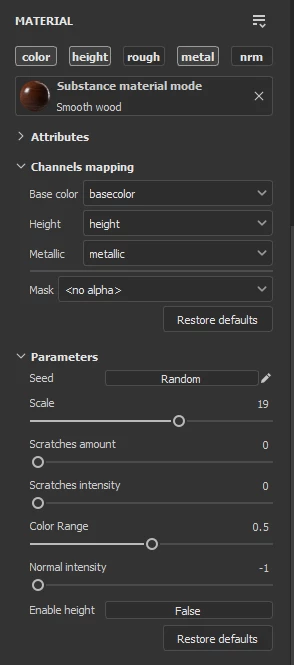
height map but in the parameters of the material there is no slider to control the strength of this

  • March 22, 2023
  • 2 replies
  • 1761 views

downloaded a free wood material from the official site, it uses a height map but in the parameters of the material there is no slider to control the strength of this parameter, I do not understand something or do not do it right?
Help please!
and additionally is it possible to rotate the smart material?

 

This topic has been closed for replies.
Correct answer Cyril Dellenbach

In the picture you shared, the Technical parameters menu is closed. Click on the menu to open it, the height values should be in there.


But if there is no slider, I'd suggest you to do as Dave suggested. 

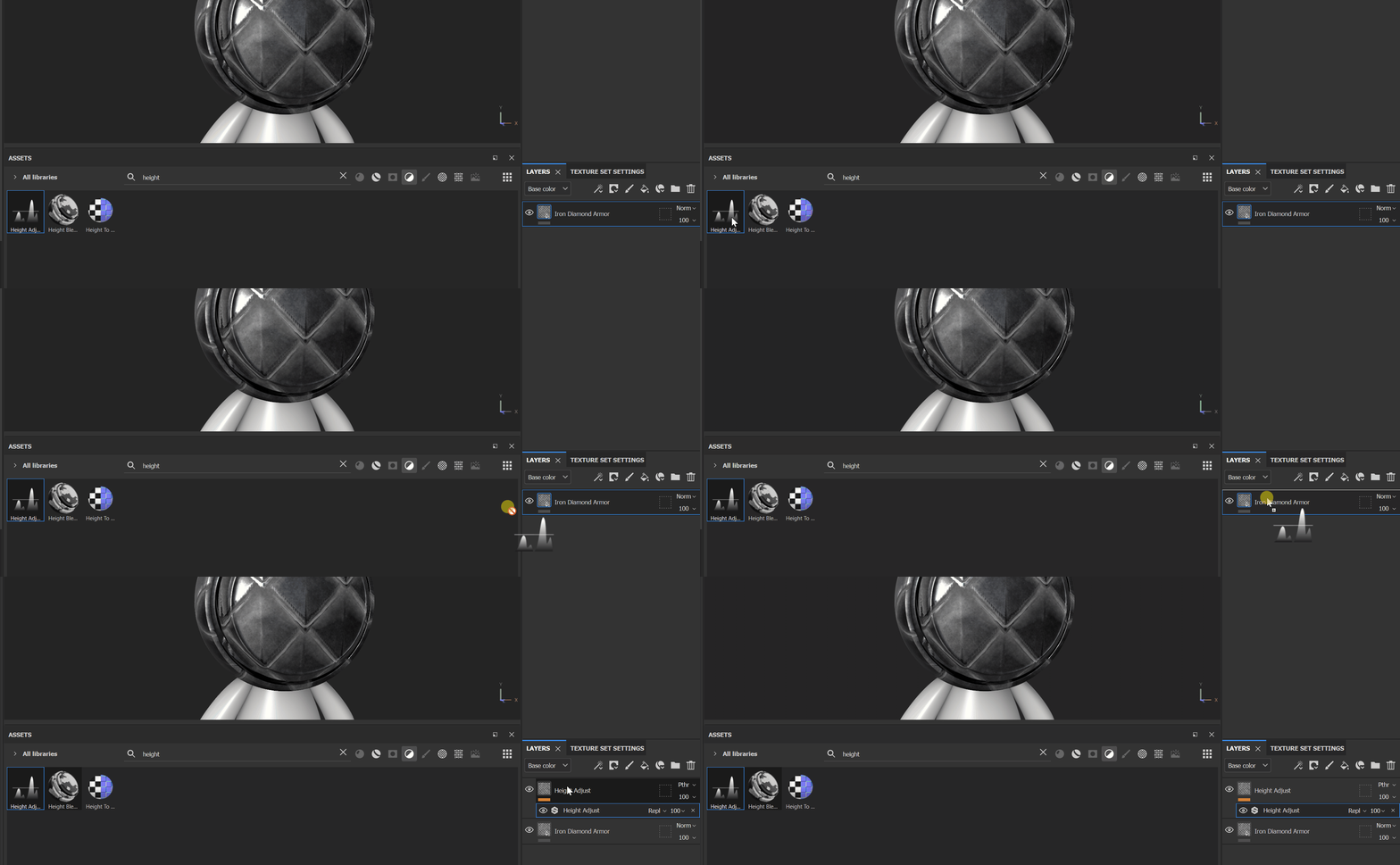
Right click on your layer>Add Filter>Filter>Height Adjust


Or you could also drag and drop the filter on top of the layer.


Best regards,


2 replies

davescm
Community Expert
Community Expert
March 23, 2023

If changing 'Enable Height' to 'True' does not give the control you need, you could add a height adjust filter immediately above the wood layer.


Dave

Known Participant
March 23, 2023

there is no slider to control the strength of this parameter,

Cyril Dellenbach
Community Manager
Cyril DellenbachCommunity ManagerCorrect answer
Community Manager
March 23, 2023

In the picture you shared, the Technical parameters menu is closed. Click on the menu to open it, the height values should be in there.


But if there is no slider, I'd suggest you to do as Dave suggested. 

Right click on your layer>Add Filter>Filter>Height Adjust


Or you could also drag and drop the filter on top of the layer.


Best regards,


Cyril Dellenbach (Micro) | QA Support Artist | Adobe
Cyril Dellenbach
Community Manager
Community Manager
March 23, 2023

Hi @mezimforte795FD1,


Thanks for the question.


Unfortunately, I wasn't able to find the same Material you used. Would you mind sharing the link to the asset? Usually, all our assets come with a Technical Parameters section where you can tweak the Height Range and Position, but from the picture you sent, I can see there is an Enable Height parameter that is set to False. What's happening when you switch it to True ?


To rotate the material, there is a ready-made option in the UV Transformations properties.


If it's a Smart Material and not a simple Material, it won't be possible to just rotate the entire group, because it contains localised details. Therefore, you'll need to check inside the Smart Mat the layers you're looking for, and tweak the Rotation directly in those layers.


Best regards,


Cyril Dellenbach (Micro) | QA Support Artist | Adobe