


Inspiring
April 13, 2024
Question

Help Needed: Incorrect Material 'Usage' Tags in Substance

  • April 13, 2024
  • 2 replies
  • 342 views

Hiya


I'm facing an issue in Substance where some materials are wrongly categorized under filters and generators. This problem is shown in the screenshots attached, highlighting the incorrect usage tags and their placement in the dropdown menus.
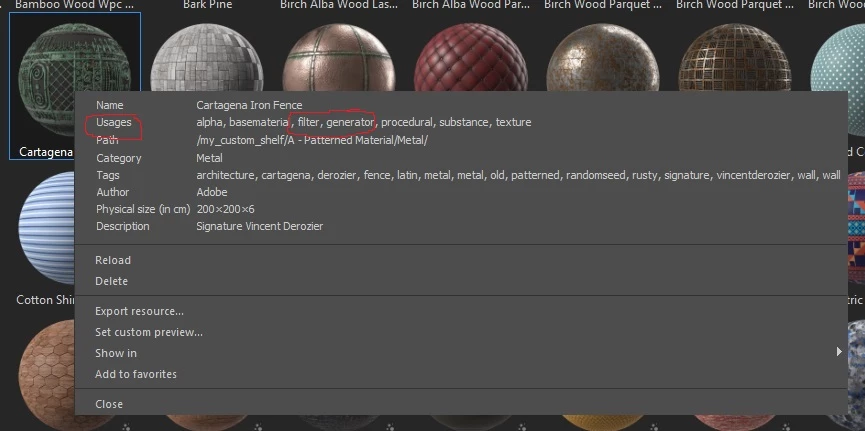
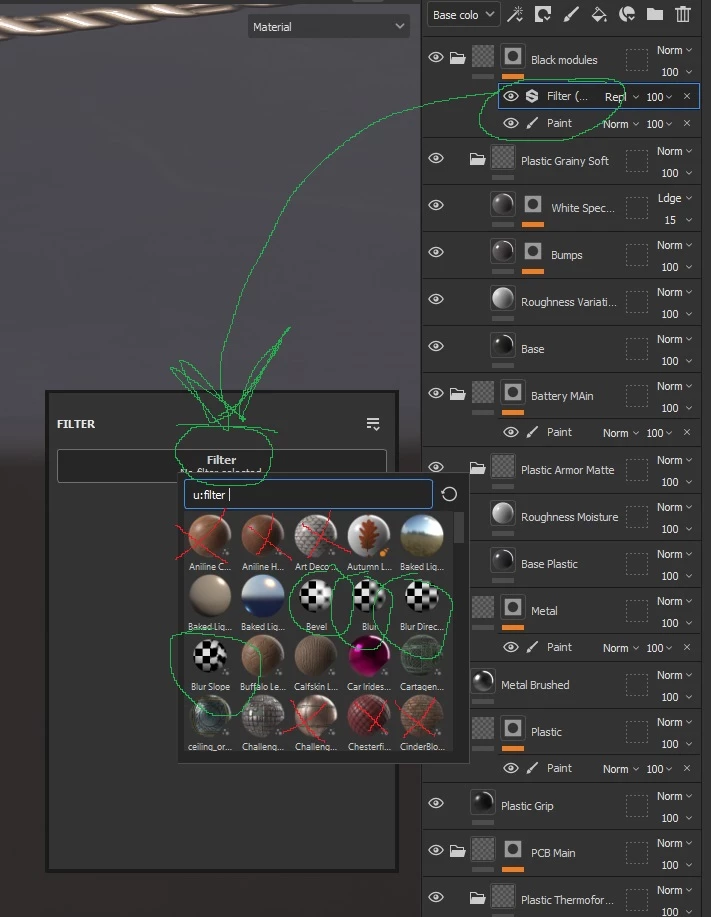


So because of the incorrect usages assigned for these materials (Image 1) they appear in the dropdown list when trying to add a filter (image 2).


I haven't found a way to correct these usage tags within painter, sampler or designer, the closest i've come is in designer but I still can't find a way to alter this information. Does anyone know how to adjust or fix these so the materials are properly categorized?


Any guidance or solutions would be much appreciated.


Thanks.

This topic has been closed for replies.

2 replies

davescm
Community Expert
Community Expert
April 13, 2024

I've just downloaded the same Catagena Iron Fence material and under 'Usages' I see this:

Did you try removing the material and re-downloading the sbsar?

or

Downloading as SBS and publishing from Substance Designer (the downloaded sbs has type as unspecified)


Dave

AT112Author
Inspiring
April 16, 2024

Hi Dave,


Thanks for the swift reply, and apologies as I've only just got around to looking into this again. I removed the sbsar and tried to redownload, but the same thing happened. I couldn't find a way to download as an sbs. On the download page I could only send the material to painter or sampler, designer is greyed out. Also I have roughly 50 materials all labelled incorrectly, so could take a while. 


I wonder if the problem stems from creating my own custom shelf and library for painter. I've copied and pasted a lot of materials from the defualt your_assets and starter_assets into my custom folders. I kept the structure of the orignal folder setup, i.e folders for filters, folders for materials and smart materials etc, so I haven't accidently put them in the filter folder or anything like that.

So I am still stumped and any extra help would be very much appreciated

Thanks again

AT112Author
Inspiring
April 13, 2024

In case it needs clearing up, the screenshots are from substance painter, the first image is when i right click on the Cartagena Iron Fence sbsar material within the library window. Its is not a filter or generator and cannot be used as one. (I tried and nothing happens)


The second image is the list of filters i get when i click add filter to a layer, the thubnails with red crosses are not filters, they are materials only, the green circled ones are actualy filters. 


It makes it really difficult to quickly add a filter as I have to sort through all those materials.


Thanks again