


Participating Frequently
August 17, 2022
Question

Hig poly or Lopoly workflow?

  • August 17, 2022
  • 3 replies
  • 441 views

Hi everyone,

i'm i trouble with a motorcycle model, and i woul like to know the correct workflow according to the final use. The final use of my model is just for visualization and not for games.

I know that the correct workflow it should be the baking of the higpoly mesh in to the lowpoly mesh and is what i triyed t o do in this case, but when i apply a subdivision to smooth the mesh for a rendere, in Blender Cycles, it shows me weird artifacts:
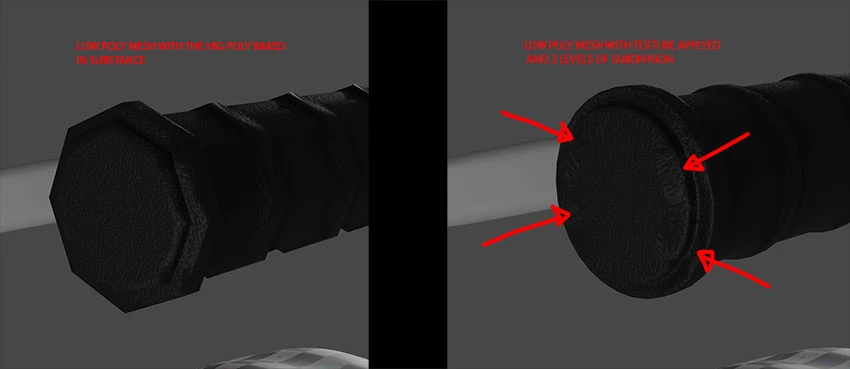
I'm clearly doing something wrong, and i suppose that my mistake is that this workflow is more fore game assets and not for visualization. I suppose that i must siply unwrap and texture managable hig poly mesh and work with it. 

I wait for your suggestions. Thanks in advance to everyone.

This topic has been closed for replies.

3 replies

Inspiring
August 18, 2022

i agree with Dave exactly. this is the workflow which it helps you to reach what you need:

1.When your modeling finished and uv unwrapped it, you have to export it as low poly and subdivide the mesh and export again as high poly.

2. bake your high poly mesh on your low poly (important step). this video may helps https://www.youtube.com/watch?v=FILl_h2E2Q4&t=6s&ab_channel=3DWolf

3. paint your mesh and export textures

4. assign them on your low poly mesh in blender or another app. then subdivide it.

if you had more details on you highpoly mesh, i recommend to use your highpoly meshes displacment map on your low poly then subdivide it.

feel free to ask anything.

Regards.

davescm
Community Expert
Community Expert
August 18, 2022

I would avoid that last step in 4  - 'then subdivide it' as that is subdividing the low poly after baking and texturing, which just increases the poly count again and risks stretching the texture . Instead, create your low poly with the vertex count you finally need and you should not need further subdivision. If that means the low poly is effectively 'medium' poly then so be it.


Dave


davescm
Community Expert
Community Expert
August 18, 2022

You seem to be creating a low poly mesh, baking on the high poly detail, texturing then, back in Blender, applying a subdivision - in other words increasing the poly count again? If so, that last step is going to impact your render by interpolating angles and corners and putting elements of the unwrap in the wrong place, which is what you are showing in your image.

If you actually need a low poly version (which you may not) only go as low as the final poly count you need and will use later.  Then bake the high poly onto that and don't increase the poly count by subdividing afterwards. There is no benefit in going lower at the texturing stage then increasing again later.


Dave


Inspiring
August 18, 2022

Hi

can you upload noraml map, displacement map and your UV map to see if displacement or normal map cause trouble?


GeoffroySC
Community Manager
Community Manager
August 18, 2022

Hi,

Have you tried unwrapping the high poly mesh? 

Participating Frequently
August 18, 2022

The point is not if i can unwrap the hig poly mesh. The point is to clarify 2 different workflows, and understand why is giving me those strange shadings.