


Participant
January 28, 2024
Question

How do I Export 2D View texture to be exactly like how it appears in the Viewport?
  • January 28, 2024
  • 1 reply
  • 1762 views

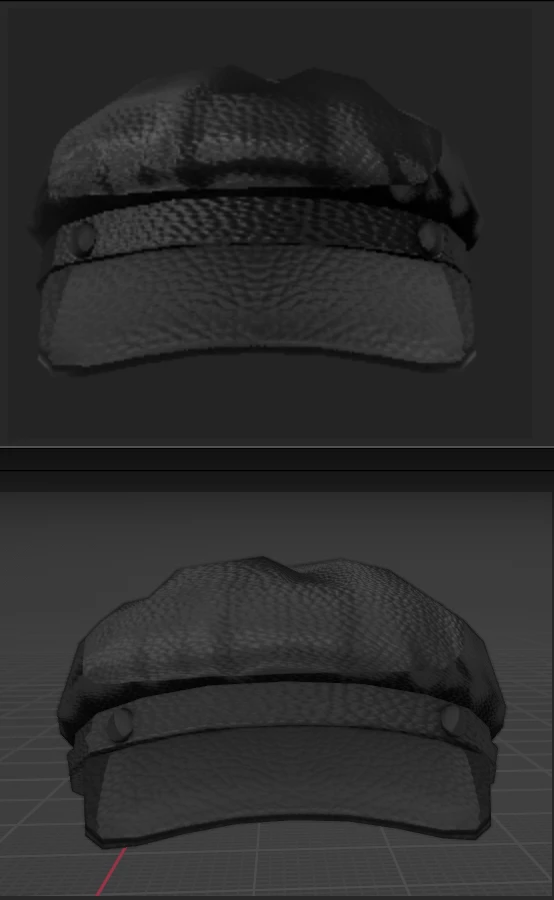
I am trying to export a 2D view. The top is in substance painter’s viewport but when I export the 2D view, I get the bottom picture.


I want the 2d texture exactly like in the substance painter viewport (the top image)


I’m a beginner and idk much, please explain, I heard you bake the lighting but I have 8 layers and I don’t know what layer to put the baked lighting environment filter on? I have no idea what to do


The hat I'm uploading is going on a platform that only accepts 1 image texture and that is the 2D View, that is why I need help with the 2D view texture because I want it to look exactly like how it looks in the viewport of substance painter.

This topic has been closed for replies.

1 reply

Cyril Dellenbach
Community Manager
Community Manager
January 29, 2024

Hi @pluffie,


Thanks for the message.


An object has usually several channels (textures) that define how the surface of the 3D mesh will behave. The Base Color will define the color, the Roughness will define how light scatter, etc.


The 2D view is a bit different, it will take a "screenshot" of the current 2D view. Natively, the 2D view is displayed in Material mode, which means that it considers the real time conditions of the model ; the result of every textures and lights in the 3D environment.


Commonly, the 2D view is used as a Base Color, but if the platform accepts Base Color map only, it means that you have nothing defining the Roughness, nothing defining the bump (the Normal map), nothing defining the metallness, etc.

Therefore, a lot of differences are to be expected.

In addition, the lights from the platfrom, and the lights from Substance Painter are also different for sure.


Regarding the idea of baking the lights, this is more or less already done when exporting the 2D view, so I wouldn't bother with such a workflow.


Considering the mentioned multiple variables, I'd say it will be difficult to make it look more like Substance Painter. In my opinion, you can darken the colors of the mesh, because the platform seems to have a higher roughness value, resulting with a lighter surface, but as long as you can't edit other channels of the platform, that will be it.


Best regards,

Cyril Dellenbach (Micro) | QA Support Artist | Adobe