Participant
May 13, 2023
Answered

How do i update the model without losing my work?

  • May 13, 2023
  • 1 reply
  • 4516 views

So, im working on a chair model and i made most of the texturing work already.


Now in blender i decided to add screws. ID mark them with Vertex color and just add the uv's of the screws in the already free parts of the UV Map.


Now i want import the updated model without losing my already textured parts and just do the textures for the screws.


any way to do this? i dont want to remake the entire thing from scratch.

This topic has been closed for replies.
Correct answer Cyril Dellenbach

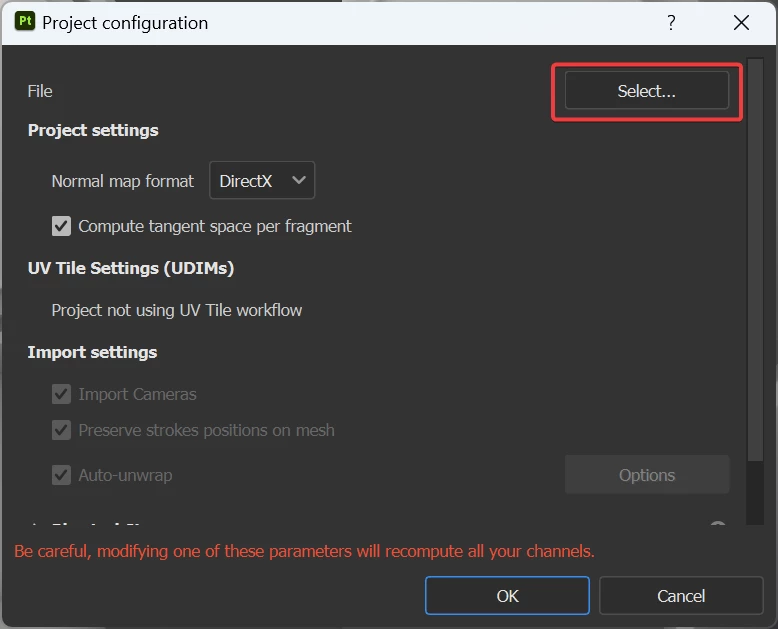
I don't know of a specific video, but you'll be able to select the new mesh from your computer trough:
Edit > Project Configuration > Select

You can then hit "OK" to confirm.


Depending on the project, I'd also advice you to check the Preserve strokes positions on mesh box. So if the reprojection fail, try with/without that option on.


Best regards,


1 reply

Cyril Dellenbach
Community Manager
Community Manager
May 15, 2023

Hello @BaidDSB-3D,


Thanks for the interesting question.


Substance 3D Painter has a 3D reprojection made for this kind of situation. To make it simple, the reprojection saves all the strokes you made in the 3D view and reapplies them on the new model. Therefore, as long as the mesh isn't too different, the reprojection should work regardless of the UVs.


Just to be sure you're not losing anything, I'd try reimporting the mesh (Ctrl + Shift + R) in a copy of the original project.


Keep me posted.


Cyril Dellenbach (Micro) | QA Support Artist | Adobe
Participant
May 17, 2023

is there a video tutorial about it?

Cyril Dellenbach
Community Manager
Cyril DellenbachCommunity ManagerCorrect answer
Community Manager
May 19, 2023

I don't know of a specific video, but you'll be able to select the new mesh from your computer trough:
Edit > Project Configuration > Select

You can then hit "OK" to confirm.


Depending on the project, I'd also advice you to check the Preserve strokes positions on mesh box. So if the reprojection fail, try with/without that option on.


Best regards,


Cyril Dellenbach (Micro) | QA Support Artist | Adobe