Participant
February 14, 2024
Answered

How do you bake ambient occlusion map from a custom added/painted height map?

  • February 14, 2024
  • 1 reply
  • 2351 views

This might be a silly noob question... but please help 🙏 I can't find anything on this.


So typically, I sculpt details on the high poly mesh in zbrush, which I then use to bake to the low poly mesh in substance painter. 


But what if I didn't have a high poly mesh with details. And let's say within substance painter, I decided to paint or just add a height map image layered on the low poly mesh. 


How do I bake that height information onto the low poly mesh so that I can export AO?


Is it that once I paint anything on the mesh that has height information, the program will already process the ambient occlusion based of it? 
This topic has been closed for replies.
Correct answer Cyril Dellenbach

In my previous message, I've shared with you a filter (the .SBSAR file) I've just made in order to convert the normal map into AO. But to be honest, I forgot we had a in house solution, which is definitely better than my .SBSAR file.


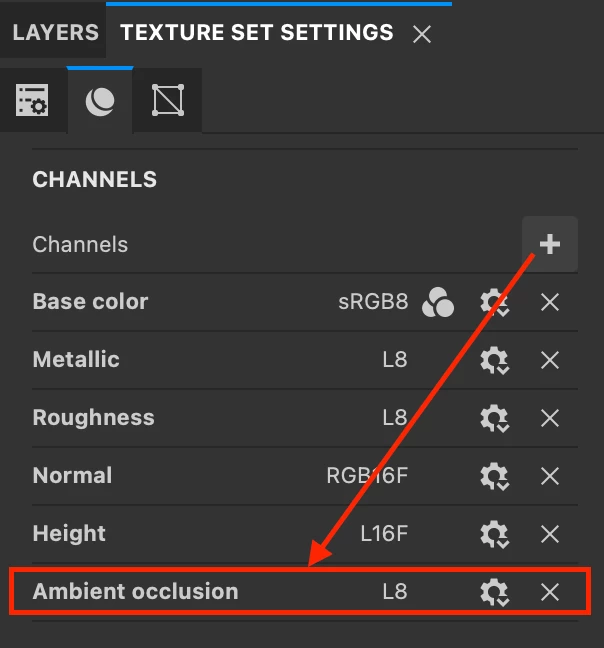
You can add the AO channel in the Texture Set Settings


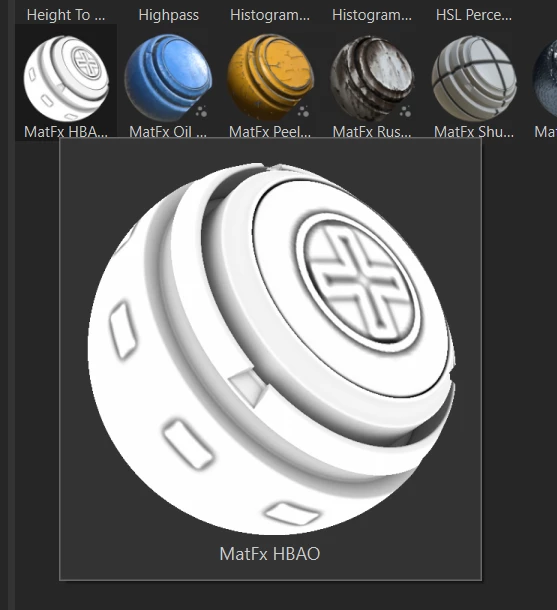
And drag & drop the MatFx HBAO filter at the top of the Layer Stack.


This will convert the Height in AO, and you'll get a few parameters to tweak it.


Regards,

1 reply

Cyril Dellenbach
Community Manager
Community Manager
February 14, 2024

There are different potential workflows.


You can add an AO channel and use the already made height layers to build manually the AO. Something similar to this tutorial.


Alternatively, once the texturing is done, you can export the Normal as you usually do, and reimport it in the soft. Than drag & drop the attached filter and plug the Normal map in it. It will convert the normal into an AO map.


Regards,


Cyril Dellenbach (Micro) | QA Support Artist | Adobe
Participant
February 14, 2024

Thank you so much for your response! 🙏 Can you please expound on the second point you made about converting normal map to AO map? I like that idea, but I can't seem to quite understand particulary this sentence you mentioned "Than drag & drop the attached filter and plug the Normal map in it. ".

Cyril Dellenbach
Community Manager
Cyril DellenbachCommunity ManagerCorrect answer
Community Manager
February 15, 2024

In my previous message, I've shared with you a filter (the .SBSAR file) I've just made in order to convert the normal map into AO. But to be honest, I forgot we had a in house solution, which is definitely better than my .SBSAR file.


You can add the AO channel in the Texture Set Settings


And drag & drop the MatFx HBAO filter at the top of the Layer Stack.


This will convert the Height in AO, and you'll get a few parameters to tweak it.


Regards,

Cyril Dellenbach (Micro) | QA Support Artist | Adobe