Participant
November 4, 2022
Answered

How to add mask to Levels

  • November 4, 2022
  • 1 reply
  • 288 views

Hi, I have a quick question. 
Does anybody know how to add mask to Levels?
I just want to brighten a specific area of a layer, not the whole. 
Thank you!

This topic has been closed for replies.
Correct answer davescm

You could do this:

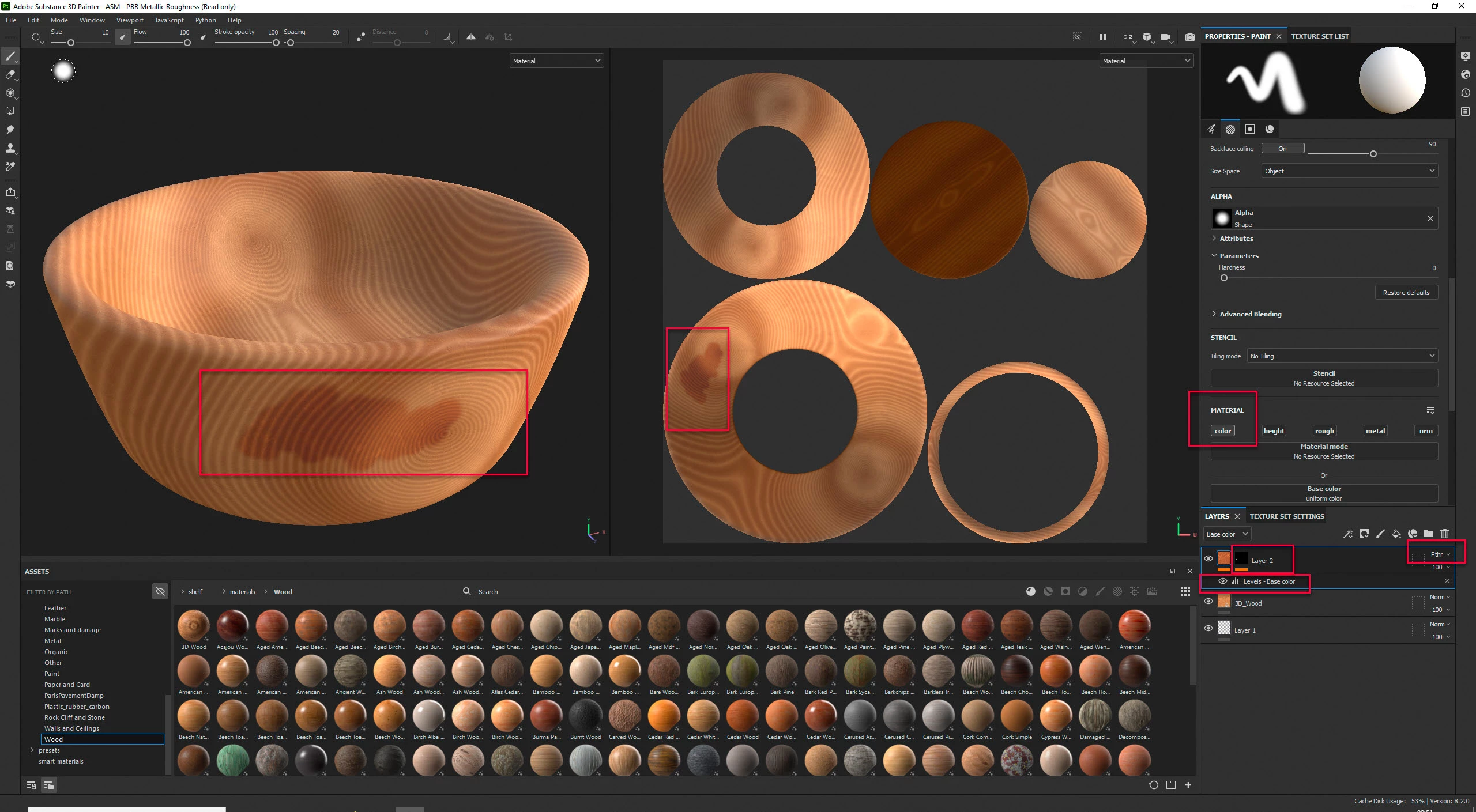
Add a new layer above the areas you want to change and set it to passthrough blend mode and only enable the channel(s) you want to affect
Add levels to that layer along with a black mask which you can paint on to reveal the levels change


Dave

1 reply

davescm
Community Expert
davescmCommunity ExpertCorrect answer
Community Expert
November 4, 2022

You could do this:

Add a new layer above the areas you want to change and set it to passthrough blend mode and only enable the channel(s) you want to affect
Add levels to that layer along with a black mask which you can paint on to reveal the levels change


Dave

Participant
November 4, 2022

Thank you so much Dave! It worked!

I didn't understand how passthrough works, but now I do, thanks to you.