


Question
How to modify layer blend opacity values via Python API in Substance Painter
I'm trying to programmatically adjust layer blend opacity values (range 0-100) in Substance Painter using the Python API.
Specifically, I need to set the blend opacity value of in this case AnisotropyAngle2
Screenshot attached showing the UI values I'm trying to modify programmatically.
I'm using Substance Painter version 10.1.2
Has anyone successfully modified layer opacity values through the Python API? Any code examples would be greatly appreciated.
code snippet to create "AnisotropyAngle2" fill layer effect
fill_effect_2 = substance_painter.layerstack.insert_fill(inside_anisotropy_fill_layer)
fill_effect_2.set_name("AnisotropyAngle2")
fill_effect_2.set_projection_parameters(substance_painter.layerstack.UVProjectionParams(substance_painter.layerstack.FilteringMode(1)))
fill_effect_2.set_blending_mode(substance_painter.layerstack.BlendingMode.Overlay, substance_painter.layerstack.ChannelType.Anisotropyangle)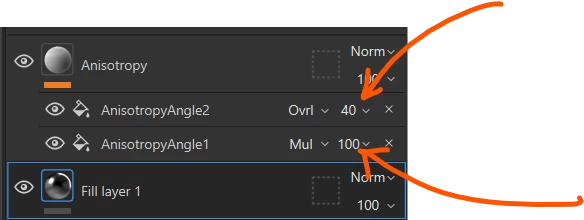
 AdChoices