


Question
How to set output colour spaces when bringing in a material?
We have files with certain suffixes we would like to set the default colour spaces for. For example with "FeathersB_RGH.png", the "_RGH" suffix should set it to "raw" rather than "auto".
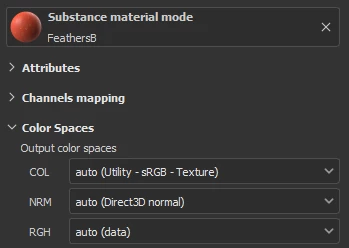
We've tried adding file_rules to the .ocio file (as explained here). Here's an example, but we've tried a few variations and none have worked:
file_rules:
  - !<Rule> {name: Roughness, extension: "png", pattern: "*_RGH*", colorspace: RAW}
  - !<Rule> {name: ColorSpaceNamePathSearch}
  - !<Rule> {name: Default, colorspace: default}
Our artist even tried specifying it in the Designer project but it still got ignored in the Painter settings. We're using .sbsar files as part of the workflow.
Am I able to set this up automatically with code or the ocio file?
 AdChoices