jimm7497115
Inspiring
September 1, 2021
Answered

I can no longer add assets to my shelf - Help

  • September 1, 2021
  • 2 replies
  • 1248 views

Hi, since the change over I can no longer add new or some old assets to my shelf. I've tried manually adding them where the others are but they still don't show up and now I have a load of brushes from Photoshop showing up as alphas. The main problem for now is why can't I add my new (and some old) assets. Some I've just downloaded from Substance Source. I can add them to the current session but I don't get the option to add them to the shelf! I've have full rights over the Document folder and I've tried changing the rights to Programs folder but, I never had this problem before.  I have assets in the same folder that show up but not others. Before the change over I had no problem adding my assets no matter if they were from ArtStation Substance Share or Source. All my ArtStation ones vanished the minute I change to Adobe's version of SP and some won't show up at all no matter what. So frustrating. I couldn't even work out how to ask in a forum. Is the SP forum closed now?

Thanks. Sorry, I'm seriously frustrated! (understatement)

This topic has been closed for replies.
Correct answer davescm

Hi

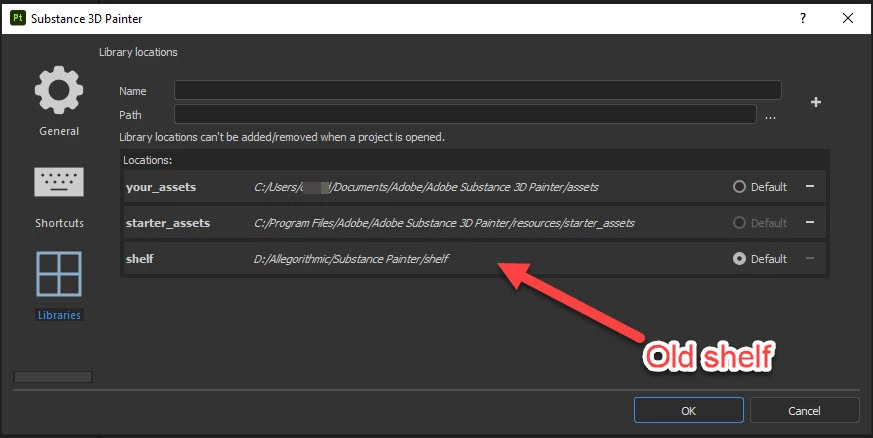
When I switched to the Adobe version the new assets folder was in a different location to the old. Rather than moving assets, I just added my old "shelf" folder to the library and all assets became visible again after restarting. Have you tried doing that?

Dave

2 replies

Canary3d
Participating Frequently
May 17, 2024

Sorry to necro this thread but I just had a similar problem, where the only thing showing up was "Alphas" after I added my giant shelf of stuff from my external disk. After about 10 minutes "brushes" showed up so I went away and got lunch, and when I came back about an hour later, the rest of the shelf was populated. So I guess it was rendering all the thumbnails or something like that...anyway IF you have a problem and it's showing "alphas," which comes in at the top of the list of stuff on the shelf, I suggest giving it 30 to 60 minutes to see if that brings everything else online. 

davescm
Community Expert
davescmCommunity ExpertCorrect answer
Community Expert
September 1, 2021

Hi

When I switched to the Adobe version the new assets folder was in a different location to the old. Rather than moving assets, I just added my old "shelf" folder to the library and all assets became visible again after restarting. Have you tried doing that?

Dave

jimm7497115
Inspiring
September 1, 2021

Thanks, yeah, but, the assets I was wanting still didn't show up. I had to download all my assets again and add them manually to the new folder but still some wouldn't show up and like I said, some are now showing up as alphas that shouldn't be. I've also got many duplicates. It's a mess. I've tried so many ways of getting the assets I want to stay on the shelf I can't even remember all of what is missing until I come to try to use it.

GeoffroySC
Community Manager
Community Manager
September 1, 2021

Hi,

If you open an older version of Substance Painter, does the issue persists?

Could you share with me your Libraries location as @davescm did? 

Would you be able to send me some of the resources that can't be loaded in your shelf? I cannot reproduce the issue on my machine. 

Thank You,

Kind Regards,

Geoffroy SC