
Participant
November 29, 2021
Answered

I have a basic question about Shader

  • November 29, 2021
  • 1 reply
  • 244 views

I have a basic question about Shader.

When i add a new param in shader,It's always lined up under common.

How to put it on the top.
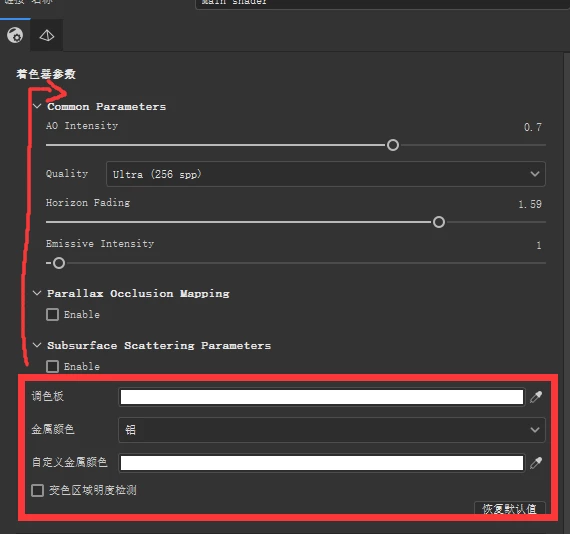
All of these parameters are commonly used.

When it's at the bottom, it's hard to use.


This topic has been closed for replies.
Correct answer Léna Piquet Froyok

That's not possible with the base UI, those common parameters are added because you are using our library helpers (includes at the top of the files), so they will be loaded first.


If you really want to have your settings at the top, you need to use a custom shader UI which is possible with a qml file. Take a look at our material layering shaders for an example (the UI files are next to it in the content folder).

1 reply

Léna Piquet Froyok
Adobe Employee
Léna Piquet FroyokCorrect answer
Adobe Employee
December 1, 2021

That's not possible with the base UI, those common parameters are added because you are using our library helpers (includes at the top of the files), so they will be loaded first.


If you really want to have your settings at the top, you need to use a custom shader UI which is possible with a qml file. Take a look at our material layering shaders for an example (the UI files are next to it in the content folder).