


Participant
May 2, 2022
Question

Importing model change (with identical UVs) is breaking texture

  • May 2, 2022
  • 1 reply
  • 318 views

After texturing a character in Painter, model changes needed to be made. 


TEXTURE

Texturing was done using fill layers, adding a black mask, then hand painting white areas of the mask.


MODEL

Model changes include ... scaled up overall, thicker arms and legs, longer arms.  The model changed but UVs were NOT changed.  The UVs are identical to the original model.


NEW MODEL IMPORT

I used Edit > Project Configuration to bring in the new model (replacing the old model).  When I do so the texture is completely messed up.  
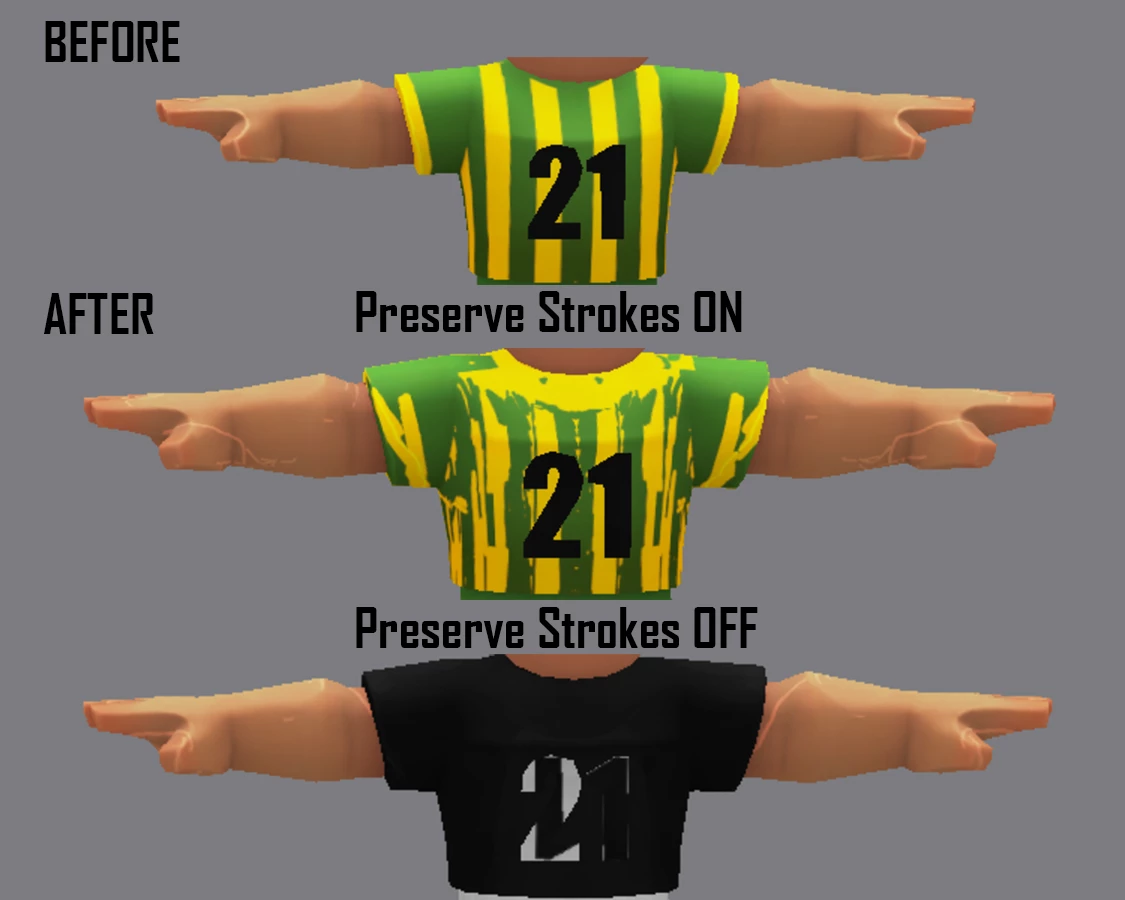
 

I thought with identical UVs the new model would come in without any problems.  What am I misunderstanding here?

This topic has been closed for replies.

1 reply

Participating Frequently
October 26, 2023

I have seen many people post this issue on the community forum and still to this day it hasn't been solved.. I know the software is based on projection what you did in the 3D viewport, if the mesh changes the shape, it will all be messed up. But why make it work if you painted on the 2D view/UV map? Couldn't you just add a feature that when you paint in the 3d viewport, also be painted on the UV map? It's so hard to paint in the 2d mode, but right now, it is the only option to not get texture messed up when updating a new mesh with new shape but the same UV and poly count. We really need an update to this as other software can let you update the mesh with different shapes and the texture would be in the right location for the new mesh.

Cyril Dellenbach
Community Manager
Community Manager
October 26, 2023

As answered on your thread,


Most of the softwares rely on UVs to reproject the textures; we don't. The downside of this workflow is what you mentioned, changing the mesh will alter the textures in most cases.


On the other hand, when the mesh hasn't change, it also allows to reproject the textures without a single variation, even if the UVs are nothing alike.


Working in the 2D view is the only situation where the reprojection will work with a different mesh, because the 2D view and the 3D view are two different spaces. When painting on the 3D view, Painter will save the strokes and the camera position, but not UV coordinates. Same goes with the 2D view, it will save the UV coordinates, not the strokes and camera.

I know it sounds like both could share the info, but this isn't as easy as it seems.


Therefore, there's nothing to solve, because there's no bug or issue, this is simply the reprojection behavior. With that being said, I definitely agree the current situation isn't the best, we don't recommend using an iteration workflow with Painter, and we're exploring solutions, but nothing to share for now.


Here's an interesting thread on the subject.


Best regards,


Cyril Dellenbach (Micro) | QA Support Artist | Adobe
Participating Frequently
October 26, 2023

Hi Cyril, thank you for the explanation. I still really hope one day it will have an option that allows you to choose which one to destroy, either 2D UV for transfer, or kept 3D projection like currently.