


vasanthakumar L
Known Participant
February 21, 2024
Question

Insect surface details using height/normal map

  • February 21, 2024
  • 1 reply
  • 288 views

Hi Everyone,

Please look at the red marked area in attached image. I have modeled this insect with smoother mesh surface. I need to add details in height/normal maps, how can I acheive this type of embossed dot details in SB Painter.
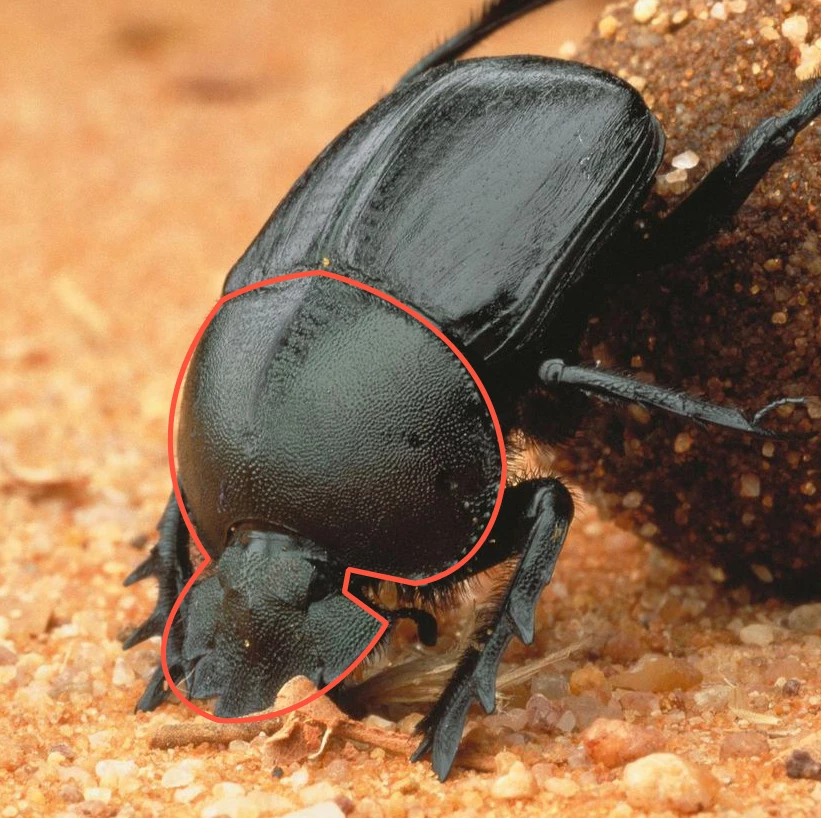
 

Thanks,
Vasanth

This topic has been closed for replies.

1 reply

Cyril Dellenbach
Community Manager
Community Manager
February 21, 2024

Hi Vasanth,


This effect can be done pretty easily. Add a Fill Layer, increase the Height Value, add a black mask, drag & drop Dirt 5 (or something similar) in the mask, and here it is.


This is a fair enough start, and you can add layers to improve details.

In my opinion, there are also better options than the Dirt 5 grunge, but I'll let you find what suits the most.


Regards,

Cyril Dellenbach (Micro) | QA Support Artist | Adobe
vasanthakumar L
Known Participant
February 21, 2024

Thanks for your reply.
I am beginner, so please explain where to drop the Dirt 5, I can't drop over the black mask in LAYERS Panel; did you mean drop to Grayscale in PROPERTIES - PAINT panel?

Regards,
Vasanth