


Inspiring
January 18, 2024
Answered

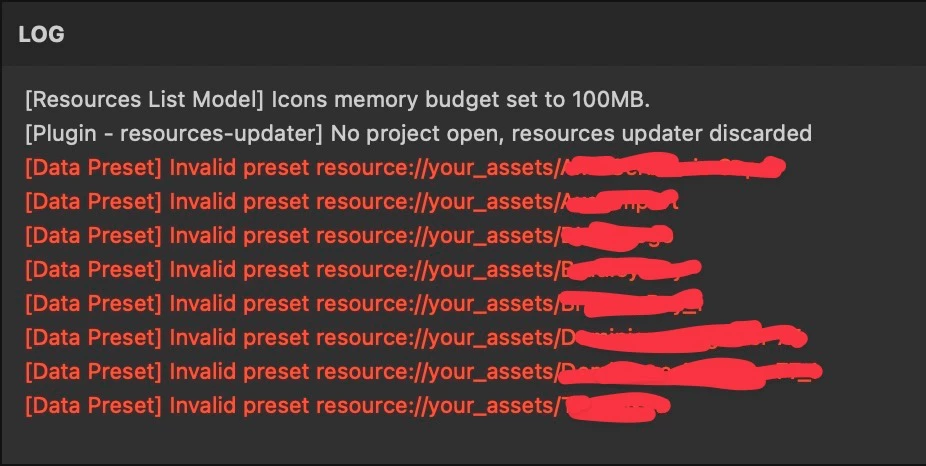
Invalid Preset Resources still visible on Substance Painter

Hi, for a long time (since I deleted some intelligent materials from the assets window) every time I open Painter they appear in the log and I don't know why but above all how to remove them...



Cyril Dellenbach
Cyril DellenbachCorrect answer
Community Manager
January 18, 2024

Hi @helpful_Glow5E6F,


Thanks for the message.


Can you check in 

C:\Users\username\Documents\Adobe\Adobe Substance 3D Painter\Assets

that the corresponding files are properly removed?


Let me know.

Cyril Dellenbach (Micro) | Product Manager | Substance Painter

4 replies

Cyril Dellenbach
Community Manager
Cyril DellenbachCommunity ManagerCorrect answer
Community Manager
January 18, 2024

Hi @helpful_Glow5E6F,


Thanks for the message.


Can you check in 

C:\Users\username\Documents\Adobe\Adobe Substance 3D Painter\Assets

that the corresponding files are properly removed?


Let me know.

Translate
Cyril Dellenbach (Micro) | Product Manager | Substance Painter
Inspiring
January 19, 2024

I'm on Mac but almost the same folder path. There was the files yet. I clean them and the messages disappeared. Many thanks. So why this happen? Isn't it enough to just delete them from the stack?

Translate
Cyril Dellenbach
Community Manager
Community Manager
January 19, 2024

It should be enough, but it was worth checking in the folder.


Regards,

Translate
Cyril Dellenbach (Micro) | Product Manager | Substance Painter