

Known Participant
February 6, 2023
Answered

Iray hard edges / broken normals

  • February 6, 2023
  • 2 replies
  • 1844 views

When rendering with IRay I'm getting hard edges / broken normals following the low poly mesh edges such as this:
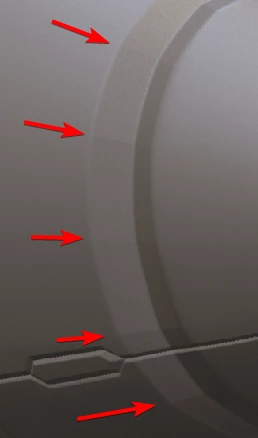
This is only visible using IRay.

How can I solve this?

Correct answer davescm

I've seen this before with path tracing on low poly models and directional lighting. Shadows are cast based on the geometry rather than the normals so you can see steps in shadows on a ground plane or on the model where the model casts a shadow on itself. A softer light can help hide it as can render settings such as the shadow terminator offset in Blender Cycles. Unfortunately Iray does not provide such a function.


Dave

2 replies

davescm
Community Expert
davescmCommunity ExpertCorrect answer
Community Expert
February 10, 2023

I've seen this before with path tracing on low poly models and directional lighting. Shadows are cast based on the geometry rather than the normals so you can see steps in shadows on a ground plane or on the model where the model casts a shadow on itself. A softer light can help hide it as can render settings such as the shadow terminator offset in Blender Cycles. Unfortunately Iray does not provide such a function.


Dave

Participant
May 18, 2024

Is there any way to prevent this from happening? I'm getting this issue in Substance and Blender. The shadow termination helps but doesn't get rid of it completely. 


davescm
Community Expert
Community Expert
May 18, 2024

To get rid of it 'completely' you would need to add polygons.

Dave

Cyril Dellenbach
Community Manager
Community Manager
February 6, 2023

Hi Anthony,


Thanks for your message.


These hard edges are probably due to your high poly mesh, but without more context it's difficult for me to help. Could you please show me your models ? Or even send it to me (you can send it to my personnal adress if you don't want to share it on this thread: cdellenbach@adobe.com)


Have a nice day,


Cyril Dellenbach (Micro) | QA Support Artist | Adobe
Known Participant
February 10, 2023

Hi @Cyril Dellenbach 

Attached are the high and low poly meshes.

Scene view:

IRay view

Please have a look.

Anthony
