Inspiring
April 6, 2024
Answered

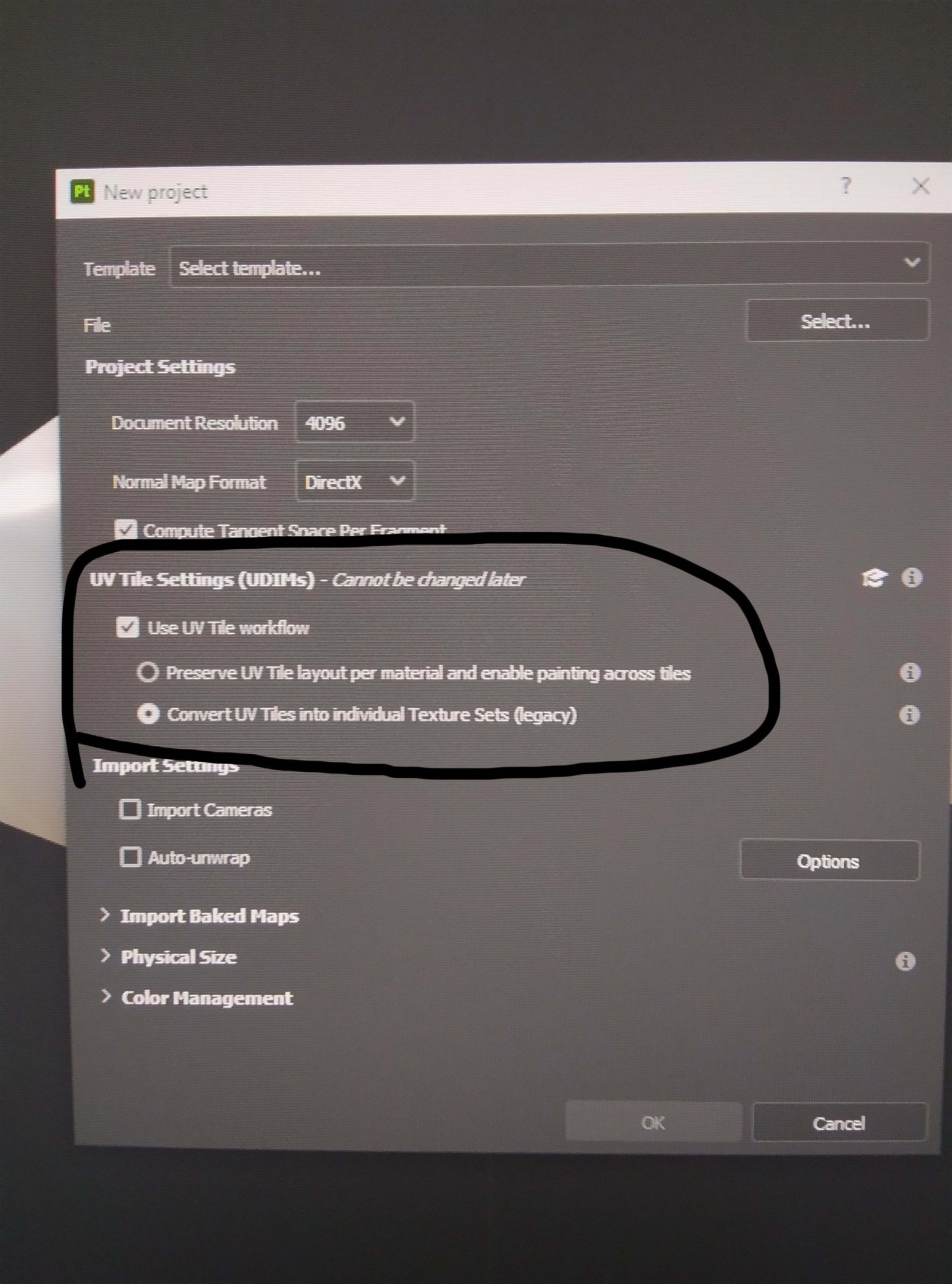
Is it possible to change UV tile workflow after baking and texturing?

  • April 6, 2024
  • 2 replies
  • 1602 views

Hi


I think it's a simple question,

I imported my character to SP while I checked "convert UV tiles into individual textures set" box. I've already baked maps and did textures but now i need to change uv tiles workflow to "preserve UV tiles layout per material and  enable painting across tiles".

Is it possible to change UV tile workflow now?

If yes, how should i change it.


This topic has been closed for replies.
Correct answer naser5E1A

I'm writing this here for those who have same problem.

As Cryril said you can't change uv tile workflow at the middle but with some effort you CAN.


I'm just making a Multi-udim (multi uv tiles) character for UE and after sculpting and etc i reached to texturing step. because of a problem i had to chose "uv tile individual texture set" BUT at the middle of texturing when i just wanted to see what I've done with textures in UE so i imported my model and textures to UE 5.1 and after some investigating i found, this UV tile workflow doesnt work in UE while my character is multi-udim!

So I had most of my character textures done but i had to change uv tile workflow so what could i do?

here is what i did and it works:

1. export All baked maps (normal,AO and ...)

2. save whole materials and masks and whatever in every uv tiles as seprated smart material (because hand painted masks is different)

3. import model again "preserve UV tile layout..." workflow

4. import maps (only first one named *.1001 for each normal,AO and ...)  and assign them to model

5. Assign smart materials to model (here is a bit tricky and need some effort)

Hope you find it helpful.

2 replies

naser5E1AAuthorCorrect answer
Inspiring
April 17, 2024

I'm writing this here for those who have same problem.

As Cryril said you can't change uv tile workflow at the middle but with some effort you CAN.


I'm just making a Multi-udim (multi uv tiles) character for UE and after sculpting and etc i reached to texturing step. because of a problem i had to chose "uv tile individual texture set" BUT at the middle of texturing when i just wanted to see what I've done with textures in UE so i imported my model and textures to UE 5.1 and after some investigating i found, this UV tile workflow doesnt work in UE while my character is multi-udim!

So I had most of my character textures done but i had to change uv tile workflow so what could i do?

here is what i did and it works:

1. export All baked maps (normal,AO and ...)

2. save whole materials and masks and whatever in every uv tiles as seprated smart material (because hand painted masks is different)

3. import model again "preserve UV tile layout..." workflow

4. import maps (only first one named *.1001 for each normal,AO and ...)  and assign them to model

5. Assign smart materials to model (here is a bit tricky and need some effort)

Hope you find it helpful.

Cyril Dellenbach
Community Manager
Community Manager
April 12, 2024

Hello @naser5E1A,


It is something you have to set up during the project creation. You can't change it afterwards.


Regards,

Cyril Dellenbach (Micro) | QA Support Artist | Adobe
naser5E1AAuthor
Inspiring
April 12, 2024

Hello @Cyril Dellenbach 

Thanks for the reply. Yep i found that but I don't know why this workflow doesn't work in UE! I tried other uv tile workflow and it works.

Also I'm trying something to be able to change workflow, at the middle of work with some try and i will write it here.