


Participating Frequently
February 27, 2023
Question

Is this brush from Substance Painter available in Photoshop?

  • February 27, 2023
  • 2 replies
  • 716 views

Hello Everyone.


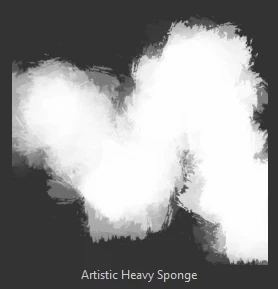
I'd like to use the "Artistic Heavy Sponge" brush in Photoshop. This is a default brush in SP but I wanna export it to Photoshop but I don't really know how I am supposed to do this. Maybe this brush is already available in Photoshop and I just couldn't find it?


Thank you in advance.
This topic has been closed for replies.

2 replies

davescm
Community Expert
Community Expert
February 27, 2023

In the meantime, you could create your own brush in Photoshop based on that brush. In Painter, stamp a white square tile with black using one click of that brush then export that as png and open it in Photoshop.

In Photoshop select all and use Edit > Define Brush Preset.

You can add random size, rotation etc in Photoshop's brush settings, using jitter and/or pen pressure control and then save as a new brush preset.


Dave

Participating Frequently
March 1, 2023

Good point, gonna try this method, thanks.

Cyril Dellenbach
Community Manager
Community Manager
February 27, 2023

Hello @assassin115,


Funnily enough, this is my favorite brush from the Substance 3D Painter library, but we unfortunately cannot send it to Photoshop. May I consider your message like a suggestion and bring it up to the team ?


Best regards,

Cyril Dellenbach (Micro) | QA Support Artist | Adobe
Participating Frequently
February 27, 2023

Yes, that would be great, thank you. It is a great brush and I ain't sure why it is not available in the Photoshop library. Hopefully the dev team will add it ot the library asap.


All the best.