


Participant
March 10, 2023
Answered

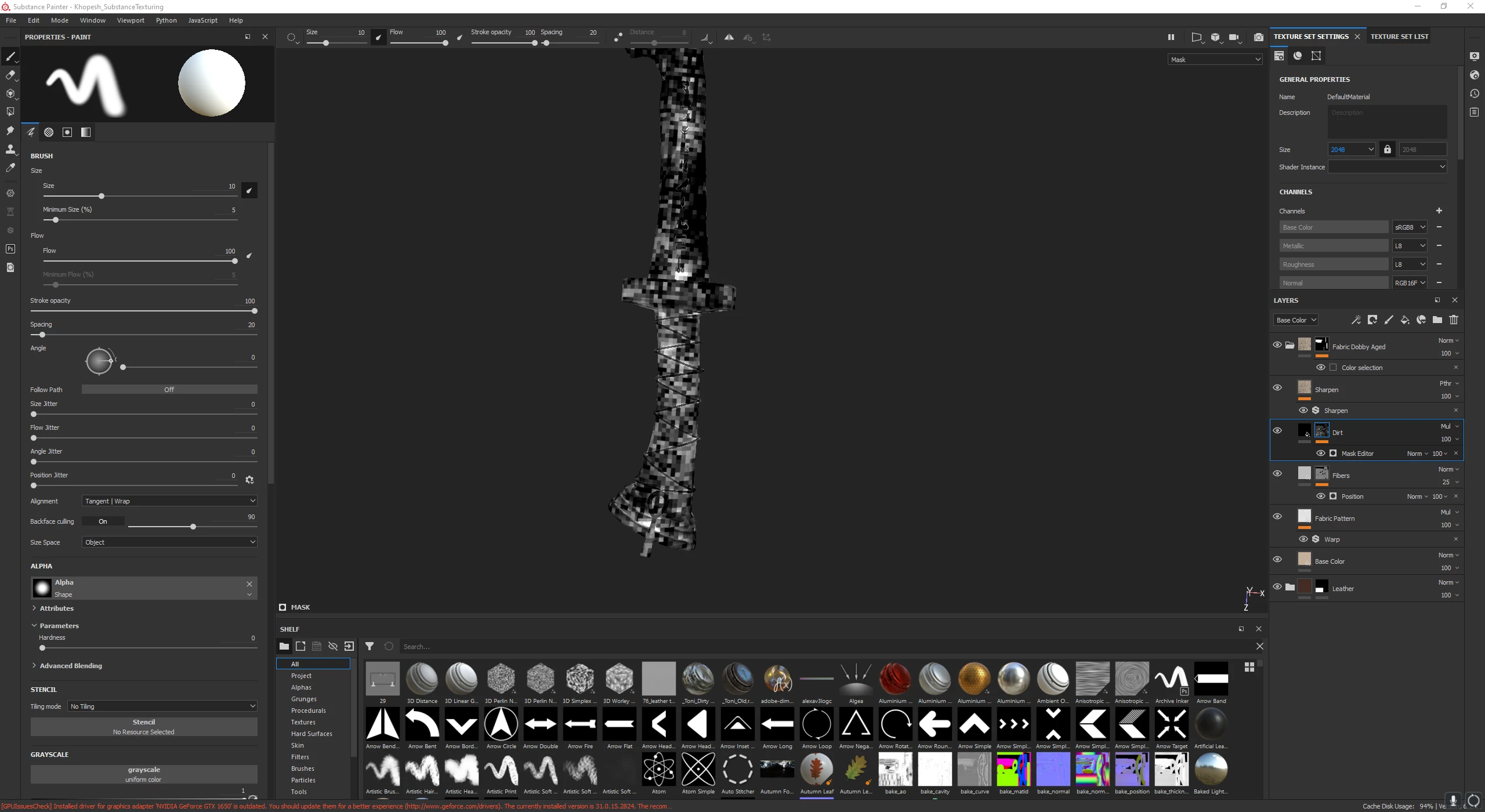
Mask editor appears as squares
  • March 10, 2023
  • 2 replies
  • 1870 views

As seen on picture, when I use some smart mask or smart materials which contain Mask Editor, they appear as squares. I bake maps in Marmoset and then import in substance painter and texture it. What could be problem?

Correct answer Radoon

Problem is fixed when maps baked directly with Substance. However I would like to be able to bake them in Marmoset and then import it, but it could be problem in Marmoset, I'm gonna contact them.
Thank you!

2 replies

Participant
June 5, 2024

If you want to bake in Marmoset, try to bake position map in 16 bit, it helped me.

Participant
March 19, 2025

This is the correct solution, upvoted!

Cyril Dellenbach
Community Manager
Community Manager
March 10, 2023

Hello @Radoon,


Thanks for the message.


The fact that you baked your maps with Marmoset Toolbag shouldn't be a problem, as long as you drag and drop those in the mesh maps slots.


It could be due to the resolution of the mesh maps, are they in the same resolution as your project ? Do the problem persists if you bake your maps directly with Substance 3D Painter ?


With that being said, I can see from your screenshot that your GPU driver is outdated, and this is where I'd advise you to start.


have a nice day.


Cyril Dellenbach (Micro) | QA Support Artist | Adobe
RadoonAuthorCorrect answer
Participant
March 16, 2023

Problem is fixed when maps baked directly with Substance. However I would like to be able to bake them in Marmoset and then import it, but it could be problem in Marmoset, I'm gonna contact them.
Thank you!