
Participant
July 30, 2021
Question

Mask normals: Mesh & underlying mix

  • July 30, 2021
  • 1 reply
  • 887 views

Hello all,


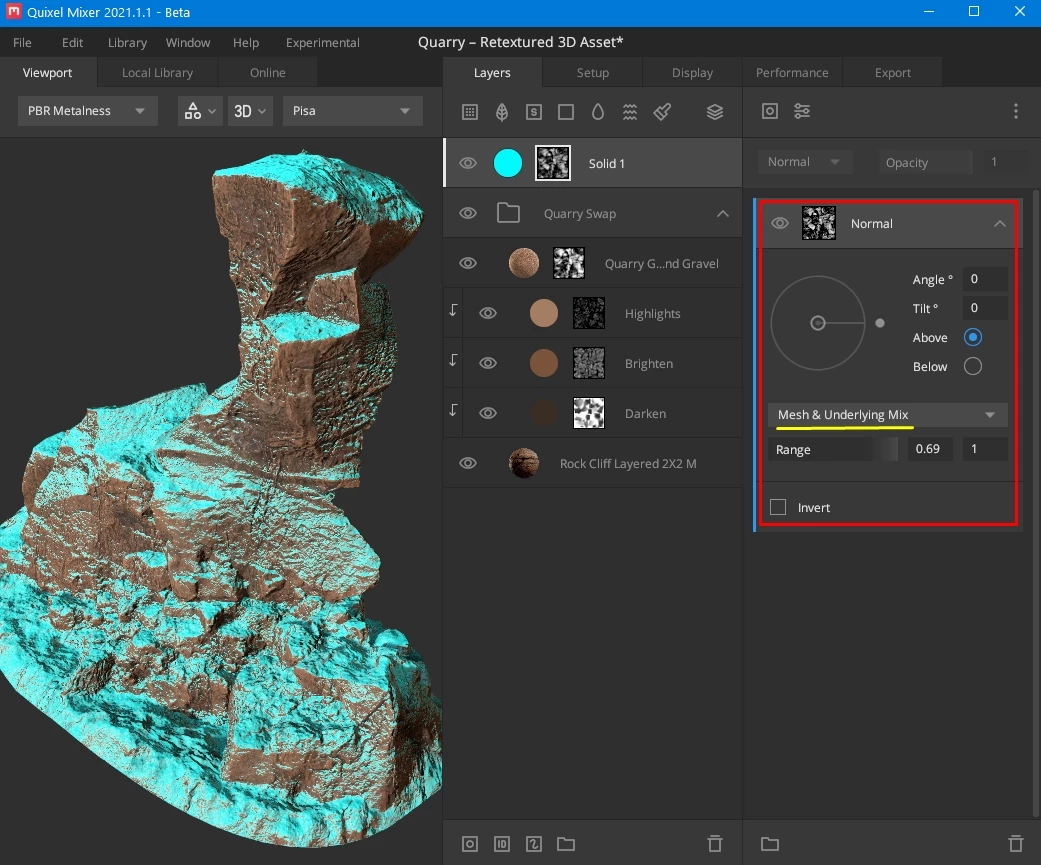
Can someone please help me make masks that do the same as this one in Quixel Mixer?

I want to generate mask that takes into account the normal information beneath the layer, not just the normals from the baked mesh map. 

In Mixer they have a normal mask layer that is very easy to manipulate direction and change to:

- Mesh only

- Mesh & base normal map

- Mesh & current layer

- Mesh & underlying mix 


(See attached image)


I have tried figuring out how to do this in substance painter but can't seem to figure it out. 
Thank-you for anyone who helps me.
This topic has been closed for replies.

1 reply

Léna Piquet Froyok
Adobe Employee
Adobe Employee
August 5, 2021

In our Mask Generators we have a "Micro Normal" input that allows to do that. This tutorial explains how to setup it: https://www.youtube.com/watch?v=Zty1TjIOg5w

Participant
August 10, 2021

Thank-you Fabrice,
That tutorial is good. 
I have been able to progress towards this a certain point. But still I dont seem to be able to achieve the same result. 
The micro details section is not available in the world space normal generator. Therefor I can't seem to just get the mask to pick up just the top side normal/height information as per the mixer mask.
I have tried using more thatn one mask layer & blending modes to create it, but I dont know how to replicate it. You will see what I have been experimenting with in attached image. I just cant figure out how to mask out the bottom edges where dust would not build up as much.

Is there something else i missing?

Thank-you.