Participant
November 25, 2024
Answered

Mask preview is gone

  • November 25, 2024
  • 1 reply
  • 1069 views

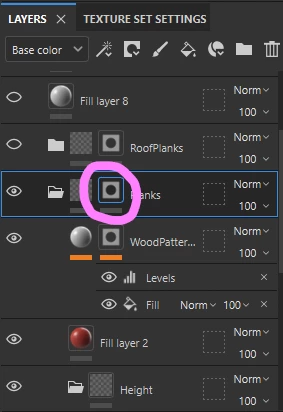
I recently updated substance painter for the first time in a long time and noticed the little preview of the mask is gone. In the old version you could see what the mask looked like in the layer window next to the material preview (as seen in the provided screenshot), is there a way to turn this on again or a setting I'm missing?

This topic has been closed for replies.
Correct answer Cyril Dellenbach

Hi @whobuysCD,


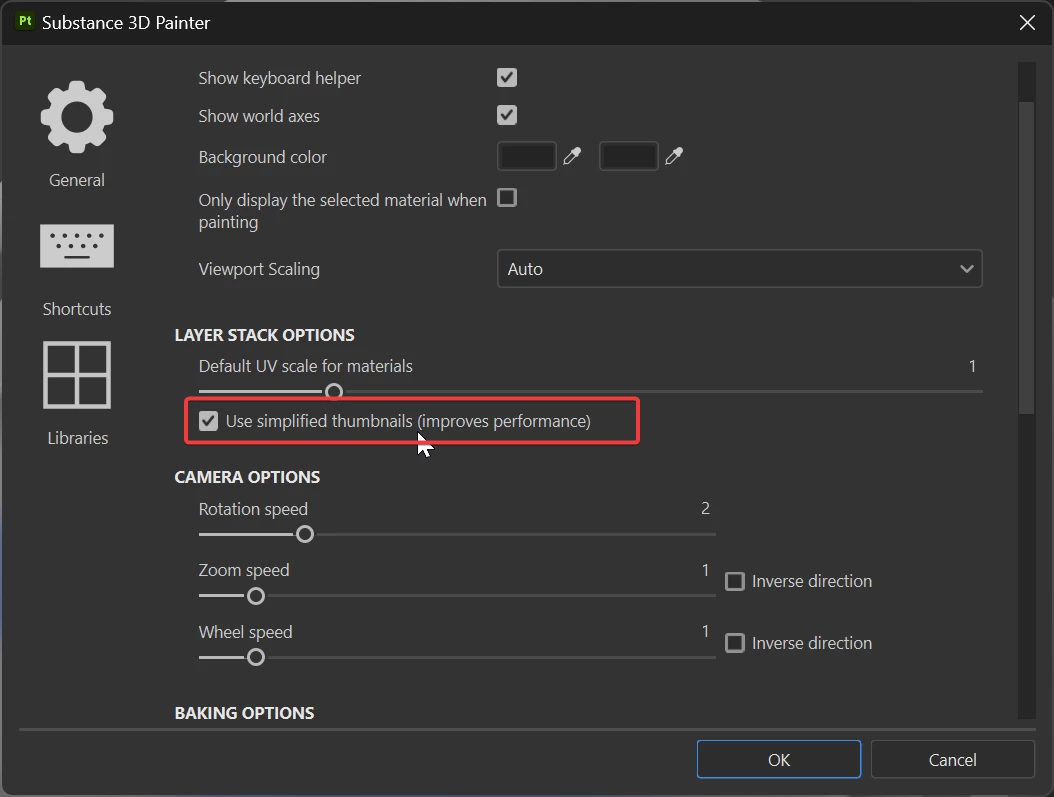
Edit > Settings > Layer Stack Options > Use Simplified Thumbnails


Please note that if you're working with UV tiles, the thumbnails are automatically simplified and this cannot be changed.


Best regards,


1 reply

Cyril Dellenbach
Community Manager
Cyril DellenbachCommunity ManagerCorrect answer
Community Manager
November 25, 2024

Hi @whobuysCD,


Edit > Settings > Layer Stack Options > Use Simplified Thumbnails


Please note that if you're working with UV tiles, the thumbnails are automatically simplified and this cannot be changed.


Best regards,


Cyril Dellenbach (Micro) | QA Support Artist | Adobe
whobuysCDAuthor
Participant
December 2, 2024

Thank you so much! that was exactly what I needed : )