


Participant
March 13, 2025
Question

normal baking problem, inverted on seams, please help

  • March 13, 2025
  • 1 reply
  • 526 views

hy guys


so i'm working on texturing a model of my own but i can't find the solution to this problem :

when i bake my model, i obtain this , which is quite cool 
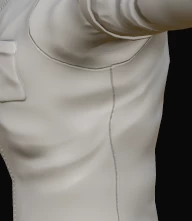
but when i look at my normals, i get this, which is a big problem
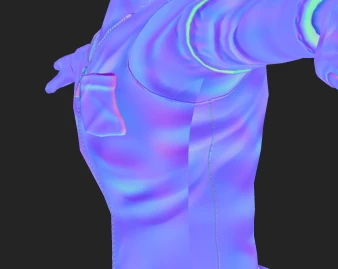


i tried a few things, flipped my UVs, but i really am out of options based on my limited knowledge of the soft


If a life saver can answer me, he'd have my eternal gratitude


thank you

1 reply

Cyril Dellenbach
Community Manager
Community Manager
March 14, 2025

Hello @jubelechien,


Great news, there's is no issue with your project.


A visible seam in your normal channel isn't a problem as long as you don't see it in your material view. It is pretty common to have normal seams, and this is due to the UV shells rotation. To make it simple, as the normals work in a tangent space, the purple (for example) will always comes from top to bottom (in DirectX format), regardless of the UV orientation. Therefore, if you paint something in between two UV shells, this may create a seam on the Normal map depending how the UVs are rotated.


In fact, these seams in the Normal map prevent seams in your Material. So don't worry, this is the expected behavior, and as long as you don't have an issue with how your material look, there are no problems.


Best regards,

Cyril Dellenbach (Micro) | QA Support Artist | Adobe
Participant
March 14, 2025

thank you for aswering me 🙂


yes in substance the behaviour is as you describe, the rel probleme occurs when i wanna use my normal map in Maya, and then the seam stays very visible, as when i look at my normal map in substance 😕😕


so do i do something wrong when i put my normal map in maya ? ( i directly put it in my geometry->bump in IAstandardSurface for arnold )


I'm a good animator/modeler/rigger but i lack a lot of practice on texturing/render, so maybe i'm doing wrong in maya


thanks a lot

Cyril Dellenbach
Community Manager
Community Manager
March 14, 2025

The normal map is probably inverted. Which renderer are you using? If it is Arnold, the Normal Map should be in OpenGL. Try to invert it and see what happens.


Cyril Dellenbach (Micro) | QA Support Artist | Adobe