


Participant
Jul 10, 2021 1:45 AM UTC
Answered

Normal maps export as if 3D Space Neighbor is active instead of UV Space Neighbor

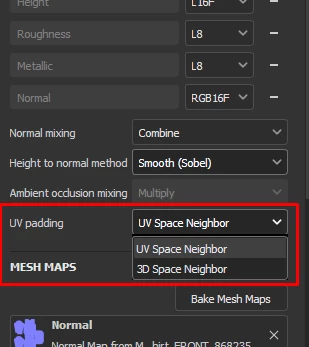
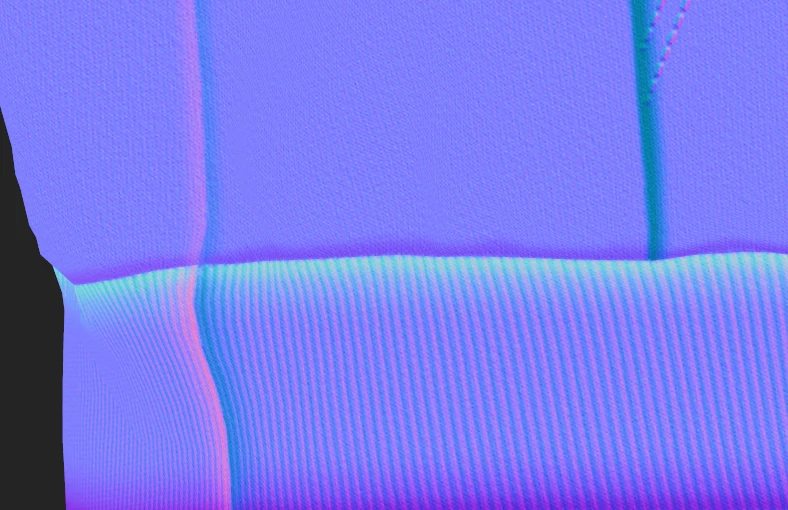
Ive tried on Substance painter 2020 and 2021, and am trying on the most recent version... all of them have had the same issue, I prefer to have all my projects set to "UV Space Neighbor" in "texture set settings" as I don't like not having control over how textures blend between seams, Problem is... all my maps will export fine as if they are and hw they appear on screen... except for normal maps which seem to export out as if 3D Space neighbor was active instead which is honestly infuriating to me. It should export as it appears on screen like all the other maps do should it not? 
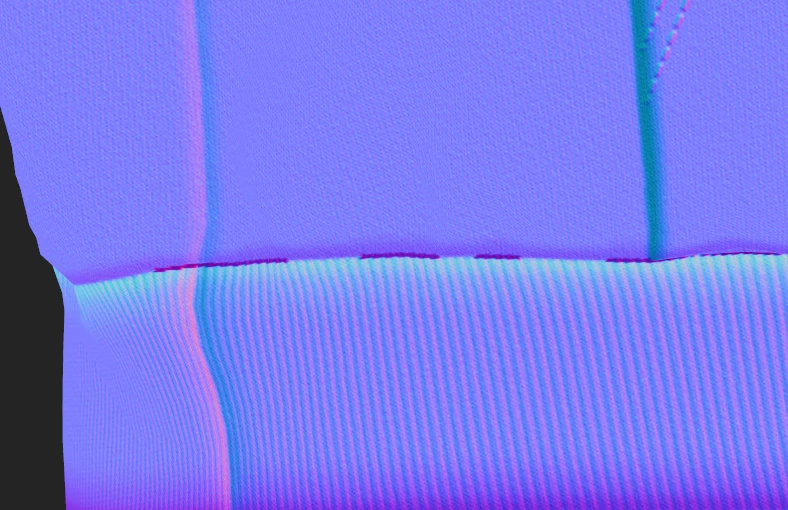
3D Space neighbor 
UV Space Neighbor
This topic is closed to new replies. Start a new post to keep the conversation going.
Cyril Dellenbach
Cyril DellenbachCorrect answer
Community Manager
Feb 1, 2024 10:55 AM UTC

This issue is now solved with 9.1.2 release.

Regards,

Cyril Dellenbach (Micro) | Product Manager | Substance Painter

17 replies

Cyril Dellenbach
Community Manager
Cyril DellenbachCommunity ManagerCorrect answer
Community Manager
Feb 1, 2024 10:55 AM UTC

This issue is now solved with 9.1.2 release.

Regards,

Translate
Cyril Dellenbach (Micro) | Product Manager | Substance Painter
vianvolaeus
Participant
Nov 13, 2023 9:32 PM UTC

This issue is still accuring for me in the 9.1.0 update. 

Translate
Participant
Apr 5, 2022 2:55 PM UTC

Issue still persists in Version 7.4.2, making the height to normal pretty much useless for me.

Translate
Léna Piquet Froyok
Adobe Employee
Adobe Employee
Apr 6, 2022 8:12 AM UTC

Hi,

The normal textures should be exported as if the setting was always set to "UV space neighbor", they are not compatible with the 3D space version (as stated in our documentation: https://substance3d.adobe.com/documentation/spdoc/texture-set-settings-29130771.html#section5 ).


Can you share an example or project of the issue ?

Translate
jitspoe
Participant
Jul 25, 2023 10:47 AM UTC

Seems the export does not match the documentation. I've created a very simple repro. In short, create a fill layer with an increased. Mask it off where some UV islands are (ex: side of a cylinder). Note that there are bumps around the other faces where the 3D space blends in. Switch to UV neighbor. Note the artifacts disappear. Export and see that the artifacts are there again in the exported normal map.


Also, apparently I can't upload .spp or .zip files here, so I zipped the file and renamed it to .txt.


Well, that didn't work.  It removed it.  Might want to get somebody on that as well.

Translate
Nova5F95Author
Participant
Jul 10, 2021 1:51 AM UTC

Here is what the exported map looks like, as you can see it has those dark patches that only appear on the 3D Space Neighbor setting.  As I said before all other map types appear to export correctly. 

Translate
