
Participant
June 25, 2024
Question

Paint over parts of Height Map with new height info?

  • June 25, 2024
  • 2 replies
  • 1582 views

Hello,
I am brand new to substance painter so I may be missing something obvious here. Is it possible to add a bottom layer material with Height info (like fabric). Then paint over that height info on a second layer with new height info (like a seam brush) that will replace the height info of the first layer rather than mixing with it? I want the second layers seam brush to mask out the Height info of the first layers fabric, not all of it - just the part where I paint with the seam brush.

Thank you much for any info
This topic has been closed for replies.

2 replies

davescm
Community Expert
Community Expert
June 27, 2024

In the layers panel for your stitches, switch to the height channel (selection box at the top left of the layers panel) and then change the blend mode from 'Linear Dodge' to 'Normal'


Dave

Participant
June 27, 2024

Thank You for the response
If I,
-open a shirt mesh
-delete existing layer
-drag a fabric material on to the shirt in 3d – it makes a new layer
-add a paint layer on top of the fabric layer, select it and double click on a seam brush from the library
-make sure the drop down just under layers is on Height
-make sure the drop down of the new layer is changed form Linear Add to Replace, and paint with seam brush

This does let me paint with the seam brush height, However as soon as I set the new layer to “replace” it removed ALL of the height information from the fabric layer below it, not just where I'm painting. I don't want to remove the fabric height information from the parts of the shirt that I'm not going to paint over with the seam brush.

Participant
June 28, 2024

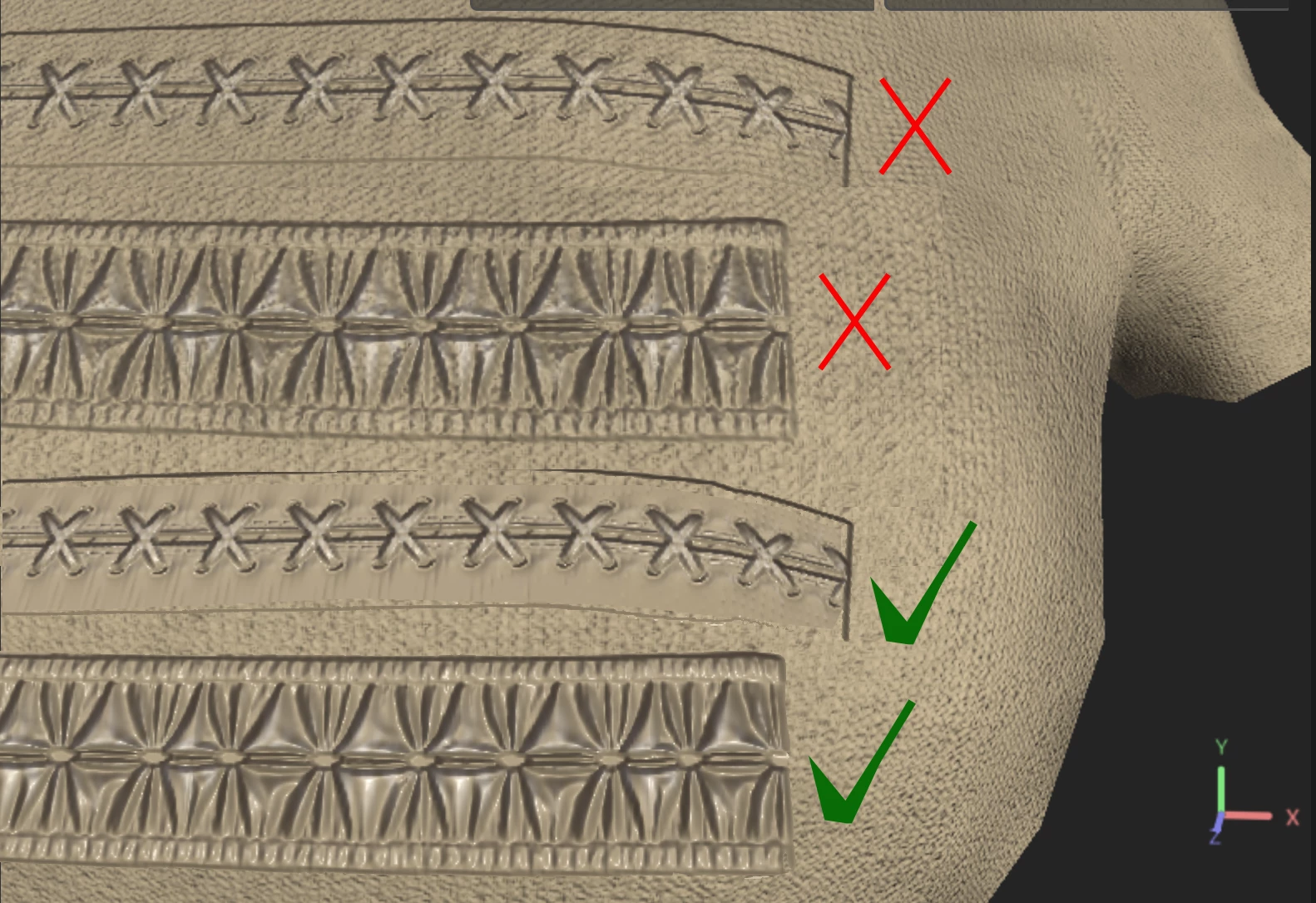
Right - my mistake - If I switch the blend mode to Normal for the Height, then the Height of the seam brush is "mixed" with the Height of the fabric (like in the top two examples of my image) - what I'm trying to get to is fto have the seam brush Height "override" the Hight of the fabric rather than mix with it.  (bottom two examples of my image)


This is what happens with normal blend mode:

jaimimcentire
Participant
June 27, 2024

You can make a new fill layer for the height of the cloth, make that layer only write to the height, and then create a layer mask to block out the portion where you don't the height info on the next layer.

Participant
June 27, 2024

Thank you for the response,
I'm going to try this but I want to make sure I understand: To do it this way means to paint the seams 2 times:
Once for the mask
Once more for the seam Height Info
I think it would be difficut to paint in the same place two times. Is there a way to copy the seam Hight layer to another layer and make it all white so it can be the mask? ...What about the path tool? Can the same paths be used on two seperate layers? If so I could set up the paths One Time, use them to make a layer of just white roller brush, then use them again on a new layer to make a layer of seam brush Height