



Part of a fill layer transparent with clean black mask, and cannot be removed
I have a fill layer with a black mask and a paint layer below the mask to reveal only part of the material on the fill layer. This mostly works fine, however now I'm struggled. It may or may not relate to my issue posted in topic Re: Stencil not working unless H+V tiling is on, a... - Adobe Support Community - 12946267.
The lower left part of the UV map or mesh remains transparent for no apparent reason. As you can see on the image below (see the layer's thumbnail), it's transparent even if the layer mask is disabled.
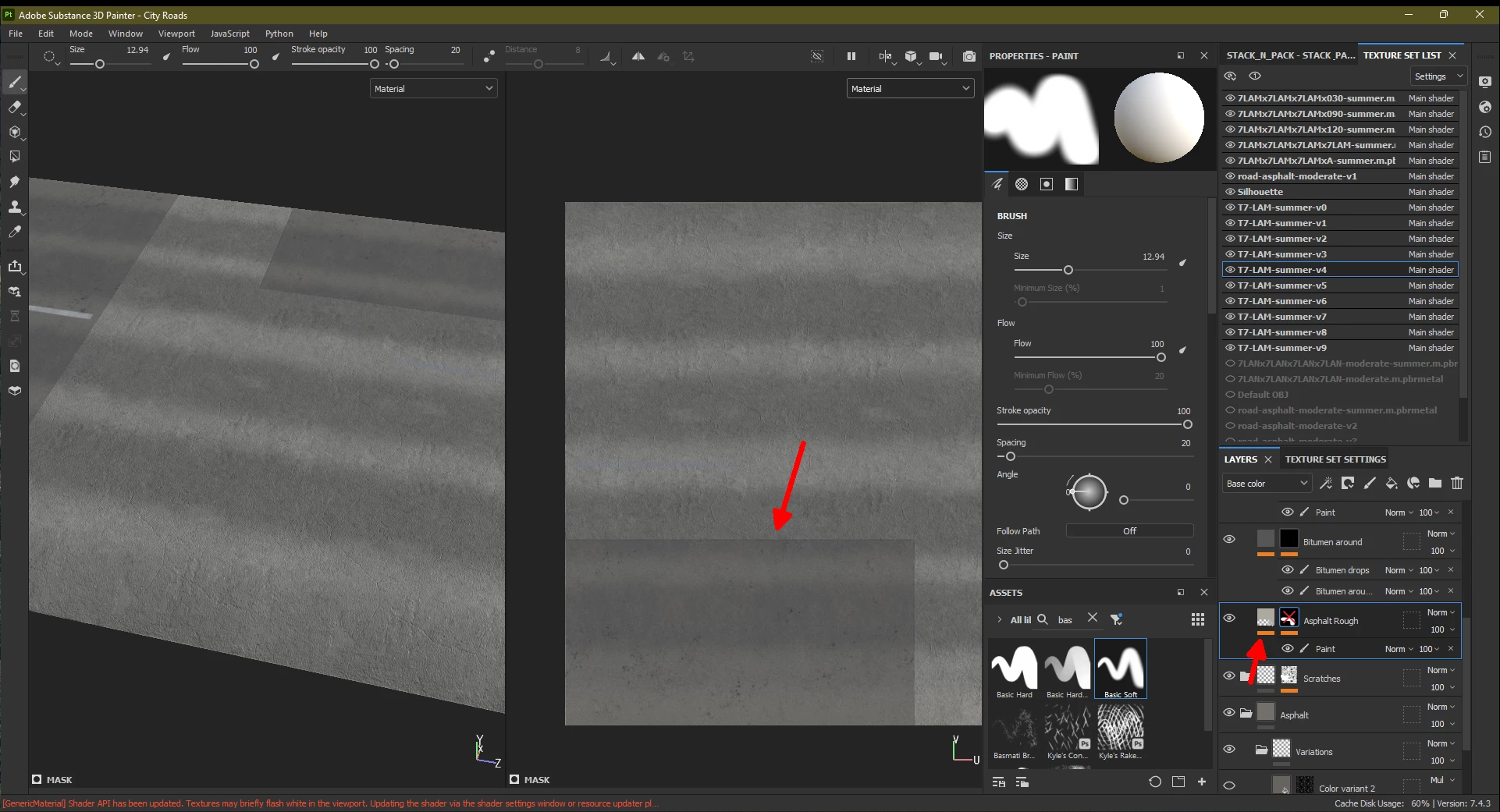
I've never seen anything like this before on a fill layer. I've attached a short video showing what happens if I try to paint on the Paint mask layer with alpha = 1 and the Basic Soft pen, with no stencil or grayscale asset set. The lower-left part simply does not reveal, suggesting data is really missing from the lower-left part of the fill layer. The thumbnails show the same transparent area if I switch to Height, Roughness, AO and the other views in the Layers pane.
Anyone any idea on how what may mask out that part and how to get rid of that? Probably I could recreate that layer from scratch, but I'd like to understand what's going on. A few days ago I used the projection tool on a Paint mask layer that has been deleted since, and with that I probably painted over that area. But once the mask layer is deleted, how can it's effect remain, and in an inverse way (the part revealed with the Projection mode is actually similar to that part that is missing now from the Fill layer).
A formal summary:
Steps: Create a Fill layer, add a mask, add a Paint layer to the mask and paint over the lower-left part of the mesh/UV island. The issue is present only with a specific layer, so I'm not sure how to reproduce the situation.
Expected result: The Fill layer is fully filled with the mask disabled.
Actual result: The Fill layer is partially transparent.
Version: I've been using 7.4.3 to create this weird situation, and it looks the same in 7.4.2 and 7.4.1.
Platform + OS: Up-to-date Windows 11 with an nVidia GeForce RTX 2060 GPU with the latest driver, 512.77.
Cheers,
Gus
 AdChoices