


Participant
March 6, 2024
Question

Prevent Height Map Data baked into Normal Map

  • March 6, 2024
  • 1 reply
  • 670 views

Hi there.


I have for my PBR Textureset for each channel as Fill Layer and applied my textures to it.
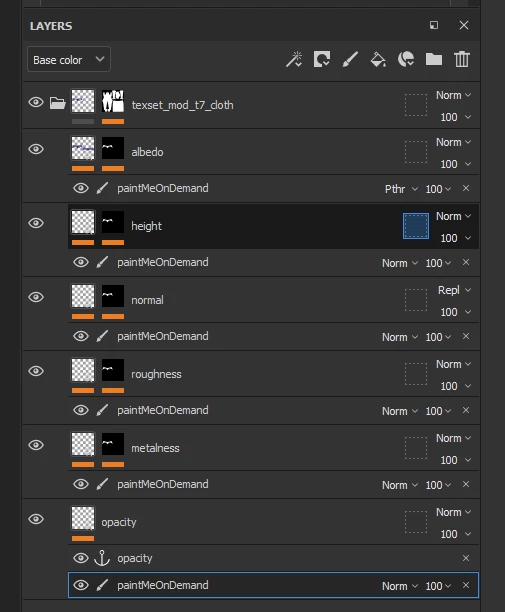
But alway when i export my maps after adjusting it in painter, my height map data ist added to my normal map.

i dont want that. I want to keep all texture channels seperated.

i changed the normal mixing mode to replace that it s still baked into my normal map:
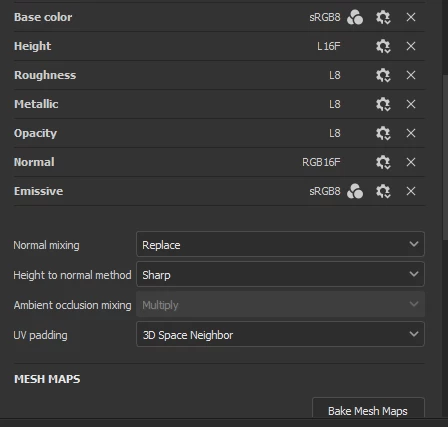
Where can i disable this?


thxs for helping

guido

This topic has been closed for replies.

1 reply

Cyril Dellenbach
Community Manager
Community Manager
March 7, 2024

Hello Guido,


Thanks for the question.


Substance 3D Painter, with most of its export presets, indeed merge the Height and the Normal channel. If you want to change this behavior, you can create your own export preset with only the channels needed.


For the record, this behavior is due to the workflow in Painter. Working with Normal resources is usually way more complicated than using Grayscale (Height) resources. In addition, it's pretty common to add Displacement at the same place at the Normal map, so it makes sense to natively combine the Height and Normal.


Regards, 

Cyril Dellenbach (Micro) | QA Support Artist | Adobe