Participant
Sep 2, 2021 7:12 PM UTC
Answered

Question about the "Getting Started with Substance 3D Painter" tutorial.

The "Getting Started with Substance 3D Painter" tutorials a re great.  I have a question about the shelves seen in the tutorial. 

The tutorial reference materials that are not in the Substance Painter install.  For exapmle, the MatFx HBAO is not in Substance Painter by default.  There are other shelves in the tutorial that are not in Painter by default, either.


Question, are the shelves used in the tutorial a seperate purchase?


Sean

This topic is closed to new replies. Start a new post to keep the conversation going.
davescm
davescmCorrect answer
Community Expert
Sep 2, 2021 8:27 PM UTC

It looks like you might have the materials filter "on" along with "hide non-applicable folders".

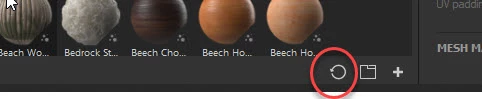
Try going to the bottom right of your shelf and click this, to reset all searches and filters:


Dave


4 replies

davescm
Community Expert
Community Expert
Sep 2, 2021 7:39 PM UTC

I'm puzzled as it's in mine. This is the Adobe version (v7.2.3) and I keep downloaded assets in a separate library folder so these are just what was installed initially.


Dave

Translate
Sean5CE4Author
Participant
Sep 2, 2021 7:50 PM UTC

Hello davescm,  this is what I see in my brand new Painter install.  Glad to hear you have it in your install.  Do I need to do anything to my install to get the shelves used in the tutorial?

Attached is a screen grab of my install assets menu.


Sean

Translate
davescm
Community Expert
davescmCommunity ExpertCorrect answer
Community Expert
Sep 2, 2021 8:27 PM UTC

It looks like you might have the materials filter "on" along with "hide non-applicable folders".

Try going to the bottom right of your shelf and click this, to reset all searches and filters:


Dave


Translate