


Participant
February 21, 2024
Answered

Re-baking smart materials with normals

  • February 21, 2024
  • 1 reply
  • 1090 views

Hi, I have a question. Maybe someone could help. In older version of Substance Painter you could rebake smart materials with replaced normal map forcing said materials to adapt.

How it worked before:

1. Paint your model

2. Export normal textures

3. Import them back

4. Replace normal mesh maps with imported ones.

5. Bake everything except normals.

6. Enjoy nice detailed textures.

But now it doesn't work anymore. So is there any way to force smart materials to also work for normals (heights) and not just for actual geometry? Oh, and I work mostly with "medium poly" models, so these is no need for high to low shenanigans. Any advice would be appreciated.

This topic has been closed for replies.
Correct answer Cyril Dellenbach

Hello @Constantine35609285vyai,


It is because the other mesh maps don't rely on the Normal map in order to bake their data.


Micro Details are an option that is available in most Smart masks/materials that allows to add details from previous layers. It works with Anchor Points.


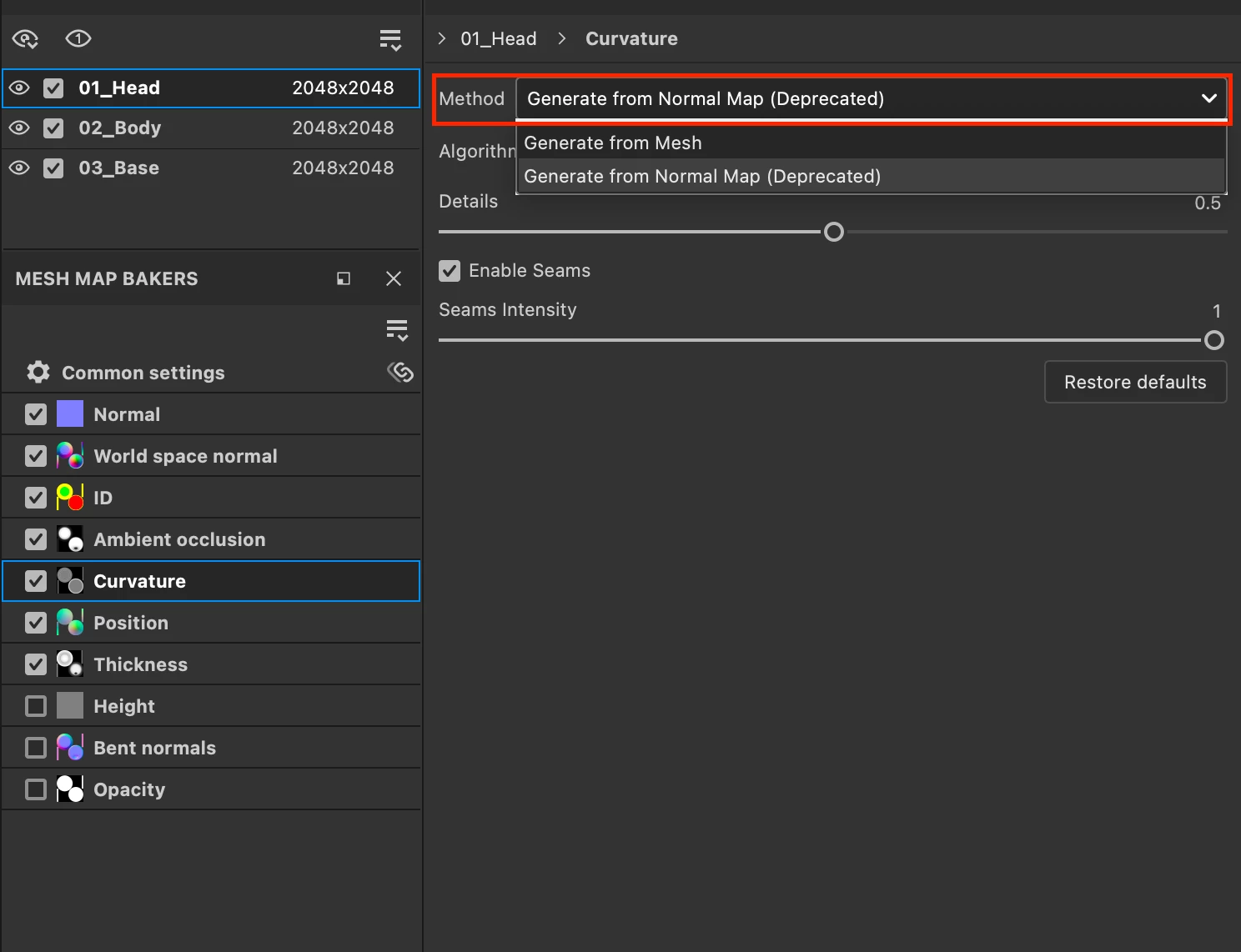
That being said, if you really need to bake your painted details in your mesh maps, they are still solutions. First of all, you can keep your Normal Map workflow. Than, switch the baking method of the Curvature for Generate from Normal Map (Deprecated).


For the AO, add an Ambient Occlusion channel in Texture Set Settings, and drag & drop the MatFx HBAO filter in the Layer stack. Now, as for the Normal Map, export the AO, reimport it in the project, and replace the current AO with the newly imported one.


This way, with the AO, Curvature and Normal, you should already have far better results with your smart materials.


Regards,


1 reply

Cyril Dellenbach
Community Manager
Cyril DellenbachCommunity ManagerCorrect answer
Community Manager
February 22, 2024

Hello @Constantine35609285vyai,


It is because the other mesh maps don't rely on the Normal map in order to bake their data.


Micro Details are an option that is available in most Smart masks/materials that allows to add details from previous layers. It works with Anchor Points.


That being said, if you really need to bake your painted details in your mesh maps, they are still solutions. First of all, you can keep your Normal Map workflow. Than, switch the baking method of the Curvature for Generate from Normal Map (Deprecated).


For the AO, add an Ambient Occlusion channel in Texture Set Settings, and drag & drop the MatFx HBAO filter in the Layer stack. Now, as for the Normal Map, export the AO, reimport it in the project, and replace the current AO with the newly imported one.


This way, with the AO, Curvature and Normal, you should already have far better results with your smart materials.


Regards,


Cyril Dellenbach (Micro) | QA Support Artist | Adobe